
Introduction
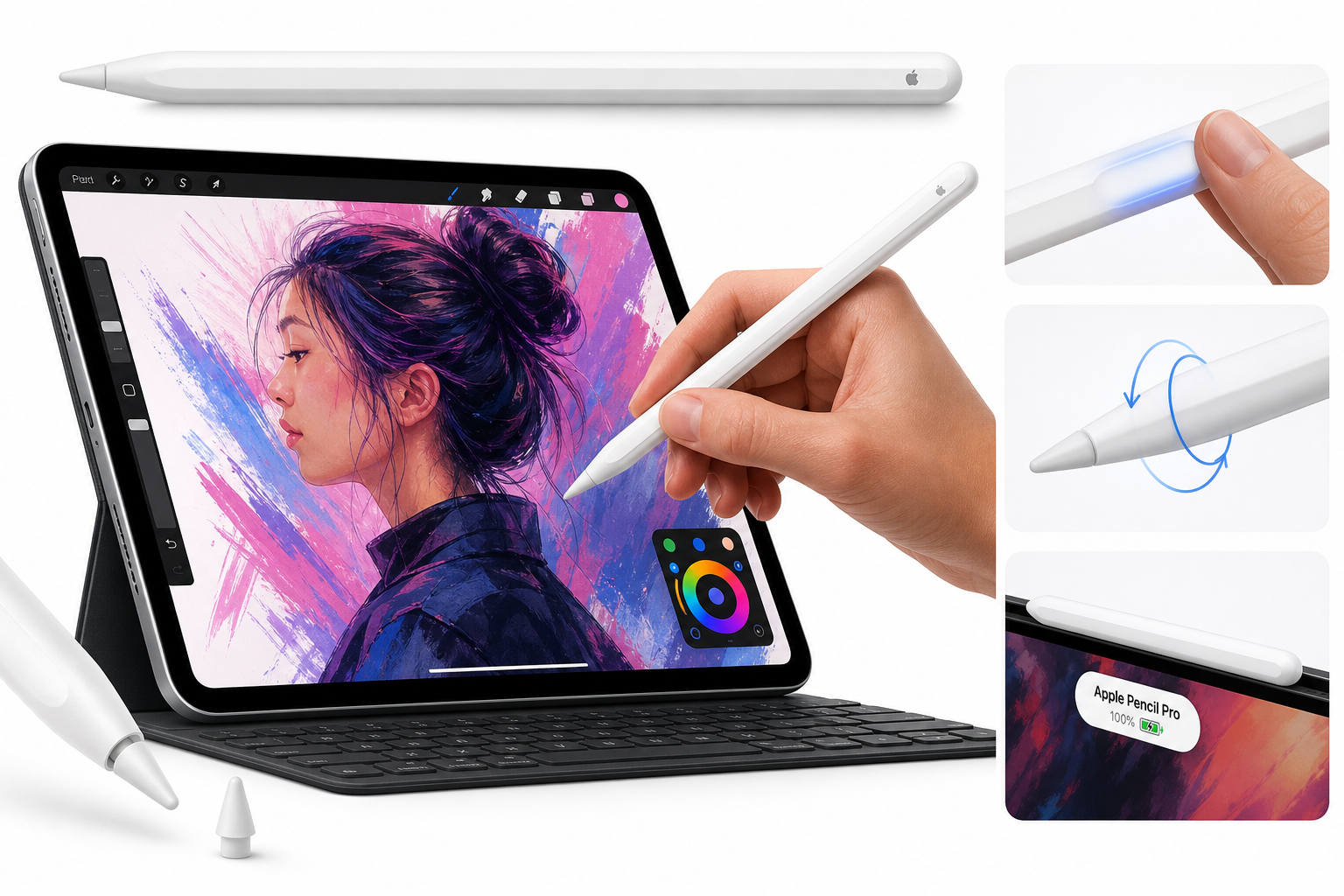
The Apple Pencil Pro is the latest flagship stylus in Apple’s lineup, designed specifically for recent iPad Pro, iPad Air, and newer iPad mini models that support its advanced sensors and magnetic interface. It builds on the strengths of earlier Apple Pencils—low latency, pixel‑perfect precision, tilt and pressure sensitivity—while adding haptic feedback, a new squeeze gesture, and a barrel‑roll feature driven by an internal gyroscope.
Physically, it retains the clean, minimal aesthetic of previous generations, with a matte finish and a flat edge that aligns magnetically to the side of supported iPads for pairing, charging, and storage. For users coming from the first‑ or second‑generation Apple Pencil, the Pro model feels very familiar in the hand but offers considerably more nuance in how it interacts with drawing and note‑taking apps.
From a value perspective, the Apple Pencil Pro sits firmly in the premium tier of styluses. On Amazon, it is typically listed around $99.00, reflecting its position as a first‑party accessory with tight ecosystem integration and hardware‑level features that most third‑party alternatives cannot fully replicate.
Typical Use Cases
1. Digital Note‑Taking for Students and Professionals
For users who rely on their iPad as a primary notebook, the Apple Pencil Pro is well suited to:
- Handwritten lecture and meeting notes
- Annotating PDFs, contracts, and research papers
- Marking up screenshots and documents
- Quick whiteboard‑style sketching in note apps
Its pressure and tilt sensitivity allow handwriting that feels closer to pen and paper, and the added haptics and squeeze gesture give you quick shortcuts for tools like highlighters, erasers, or shape tools in compatible apps.
2. Drawing and Illustration
Digital artists benefit from a combination of hardware and software features:
- Pixel‑level accuracy for detailed line work
- Pressure‑based line weight variation
- Tilt for shading with pencil and brush tools
- Barrel roll to dynamically rotate brush shapes
This makes it a strong choice for sketching, inking comics, character design, and painting in apps like Procreate, Adobe Fresco, and similar tools that support the new APIs.
3. Graphic Design, UI/UX, and Technical Drawing
Designers and technical users can use the Apple Pencil Pro for:
- Wireframing interfaces and interaction flows
- Vector illustration and logo design
- CAD‑style sketching and annotation
- Layout markups for print or web
Here, barrel roll and squeeze can be mapped to tool adjustments or quick menus, helping reduce reliance on on‑screen controls and speeding up repetitive tasks.
4. General iPad Navigation and Markup
While the Pencil Pro is overkill purely for navigation, many users keep it attached to the iPad for:
- Precision tapping and cursor‑like pointing in dense UIs
- Quick scribble‑to‑type interactions in text fields
- Marking up screenshots and photos on the fly
The magnetic charging and pairing model encourages this casual, always‑available usage—if your iPad is compatible, the Pencil Pro effectively becomes an extension of the device.
Performance in Each Scenario
Note‑Taking Performance
In note‑taking apps, performance is characterized by extremely low latency and highly responsive pressure control. The stylus tracks fast handwriting well, including quick shorthand, cursive, and diagramming. Handwriting feels predictable and smooth, even when rapidly switching between pen styles or zoom levels.
The squeeze gesture can be configured in supporting apps to bring up tool palettes or switch pens, which is particularly useful when moving between writing and highlighting modes. Haptic feedback adds a subtle physical confirmation that a mode switch or action occurred, reducing the need to constantly check tool icons on screen.
For extended writing sessions, the ergonomics are good: the weight is well balanced and the matte finish helps avoid slipping. Most users should be able to take multi‑hour notes before grip fatigue becomes noticeable, especially if they already tolerate traditional pens or mechanical pencils for long periods.
Drawing and Illustration Performance
For artists, the Apple Pencil Pro’s precision and sensor suite are the main differentiators.
- Line quality: Stroke rendering is clean, without visible jitter or lag under normal conditions. Fine cross‑hatching and micro adjustments to line weight are possible with light pressure variation.
- Pressure range: The pressure curve supports a wide dynamic range, from very faint sketch lines to bold, opaque strokes. Many apps let you customize this curve to match your preferred feel.
- Tilt and shading: The stylus detects tilt reliably, enabling realistic shading with pencil, charcoal, and airbrush tools. This is particularly useful for concept art and life drawing.
- Barrel roll: The integrated gyroscope tracks rotation, allowing you to rotate brush shapes—such as calligraphy nibs or textured brushes—simply by rolling the Pencil between your fingers. Once you adapt to it, this can significantly speed up workflows that require directional strokes or pattern alignment.
- Haptic feedback: Gentle taps provide confirmation when tools or modes change (for example, when a brush snaps to a guided shape or when a gesture is recognized), offering a more tactile feel than previous models.
Overall, latency and stroke fidelity remain among the best available on tablet platforms when paired with a modern, compatible iPad.
Design, UI/UX, and Technical Work
In vector and layout applications, the Apple Pencil Pro’s benefits are more about control and precision than expressive strokes.
- The fine tip and high sampling rate enable precise placement of anchor points, handles, and guides.
- Barrel roll can be mapped to adjust angle‑dependent tools like calligraphy pens or pattern brushes.
- Squeeze gestures often become shortcuts for toggling between selection and drawing tools, or for invoking contextual menus.
When combined with a large iPad Pro display, this can approximate aspects of a traditional pen‑display tablet workflow, making on‑the‑go design work more practical.
Everyday Navigation and Productivity
For general navigation, the experience is straightforward: taps register accurately, text selection is precise, and handwriting recognition (via Scribble in supported regions) is responsive. The Pencil Pro does not change the fundamentals here compared with older Apple Pencils, but haptics and hover support (where available) can make target selection and previewing interactions slightly more intuitive.
Battery life, while not explicitly displayed as a separate metric during casual use, is sufficient for a full day of mixed note‑taking, sketching, and navigation. Because it charges wirelessly whenever magnetically attached to the iPad, most users will rarely encounter a completely depleted stylus unless it has been left off the device for an extended period.
Strengths Across Scenarios
- Tight Ecosystem Integration
- Instant magnetic pairing and charging when attached to the side of compatible iPads.
- Automatic recognition and configuration within iPadOS and Apple’s own apps.
- High‑Fidelity Input
- Pixel‑perfect precision with very low latency, especially on newer high‑refresh iPad displays.
- Reliable pressure and tilt sensitivity suitable for professional‑level illustration and design.
- Advanced Interaction Features
- Squeeze gesture adds a context‑sensitive input method without reaching for on‑screen controls.
- Barrel roll (gyroscope‑based rotation) makes shaped brushes and nibs more controllable and natural.
- Haptic feedback provides subtle but useful confirmation of actions, improving confidence in gesture‑driven workflows.
- Ergonomics and Build Quality
- Comfortable, pen‑like feel with a secure grip and balanced weight.
- Minimalist, durable design typical of Apple hardware.
- Always‑Ready Experience
- Because it stores, pairs, and charges magnetically, the Pencil Pro is almost always ready when you pick up your iPad.
- No cables or separate charging docks to manage.
- Strong Support in Creative Apps
- Many mainstream drawing and note‑taking apps have either adopted or are in the process of adopting features like squeeze and barrel roll, making the hardware capabilities increasingly useful over time.
Limitations Across Scenarios
- Compatibility Restrictions The Apple Pencil Pro only works with a limited set of newer iPad models that support its specific magnetic and sensor interface. Older iPads that worked with earlier Apple Pencil generations or third‑party styluses may not be compatible. Buyers should carefully check device compatibility before purchase.
- Premium Pricing Positioned as a flagship accessory, the Apple Pencil Pro commands a premium over many third‑party alternatives and even some earlier Apple Pencil versions. Although the price on Amazon can fluctuate, it generally remains in a higher bracket around $99.00, which may be difficult to justify for casual note‑takers or users who only occasionally annotate documents.
- Feature Dependence on App Support Advanced functions like squeeze actions, barrel roll, and nuanced haptics depend on app‑level integration. In apps that have not yet implemented these APIs, the Pencil Pro behaves more like a refined version of the Apple Pencil (2nd generation), and the extra capabilities may be underused.
- Limited Cross‑Platform Utility The Pencil Pro is locked into the Apple ecosystem and only useful with compatible iPads. It cannot be used with Macs, iPhones, or non‑Apple devices, which may be a consideration for users who move between multiple hardware platforms.
- Learning Curve for New Gestures While the squeeze and barrel‑roll gestures are powerful, they do introduce a short learning curve. Users transitioning from older Apple Pencils may accidentally trigger actions until muscle memory adjusts.
- Replacement Tip and Accessory Costs Over time, heavy users will need to replace nibs, adding ongoing cost. Official tips are typically more expensive than third‑party options, though using non‑genuine tips can affect feel and reliability.
Verdict
The Apple Pencil Pro is a well‑executed evolution of Apple’s stylus lineup and a strong match for users who treat the iPad as a serious creative or productivity tool. Its combination of pixel‑level precision, low latency, and expressive pressure and tilt control meets the needs of illustrators, designers, and advanced note‑takers, while new features like haptic feedback, squeeze gestures, and barrel roll introduce interaction possibilities that go beyond what earlier Apple Pencils offer.
For artists, designers, and students using a compatible iPad, the Apple Pencil Pro justifies its premium positioning, particularly if you spend significant time drawing, annotating, or designing on the device. For casual users who primarily browse, read, or occasionally highlight documents, a less expensive stylus—or earlier Apple Pencil model, where compatible—may be sufficient.
If you own a recent iPad model that supports the Apple Pencil Pro and you rely on digital ink as part of your daily workflow, this stylus is one of the most capable and polished options available. The upfront cost around $99.00 is high, but for the right user, the combination of performance, ecosystem integration, and forward‑looking interaction features makes it a compelling long‑term investment.