
Amazon Echo Auto Review
Introduction
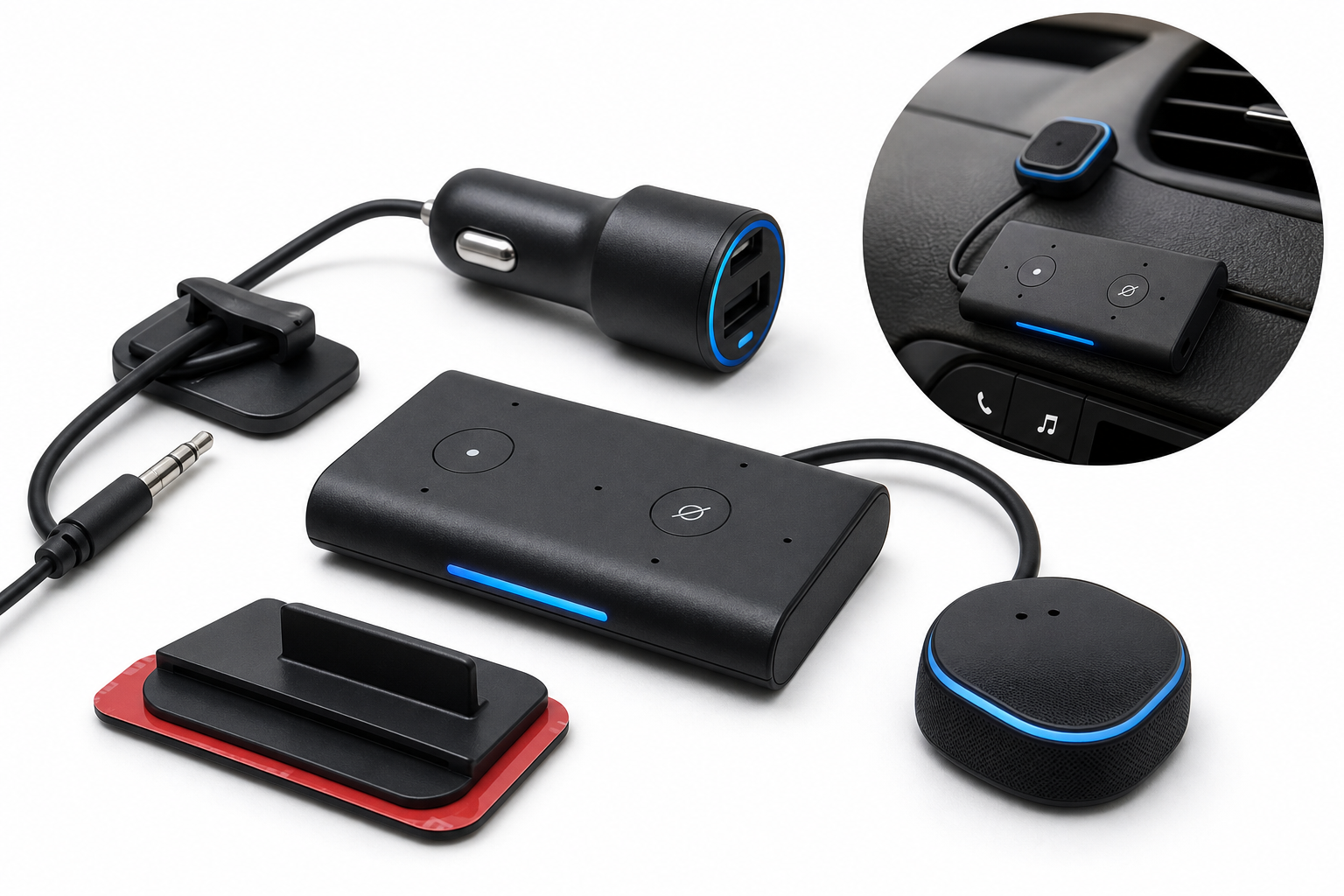
The Amazon Echo Auto (2nd Gen) is Amazon’s answer to drivers who want the convenience of Alexa on the road without replacing their car’s existing head unit. This slim, two-part accessory (a low-profile main unit plus a small external microphone module) connects to your car via Bluetooth or a 3.5 mm auxiliary cable and relies on your smartphone’s data connection and the Alexa app for connectivity.
With a 5-microphone array designed to hear you over road noise, air conditioning, and music, Echo Auto aims to make voice control a natural part of your driving routine. It lets you ask Alexa for music, navigation, calls, messages, smart home control, and more, using the same skills and routines you may already rely on at home.
In this review, we’ll focus on how Echo Auto performs in real-world scenarios, where it excels, where it struggles, and whether it’s a worthwhile addition to your car.
Typical Use Cases
1. Daily Commuting
For many drivers, the primary appeal of Echo Auto is streamlining repetitive, everyday tasks during commutes:
- Starting playlists, radio stations, or podcasts with voice commands
- Getting traffic and weather updates before and during the drive
- Adding items to shopping lists and to-do lists hands-free
- Setting reminders and calendar events on the fly
- Making or receiving hands-free calls
Because the device is always listening for the wake word (when powered and connected), it can feel more like a dedicated voice assistant than simply using the Alexa app on a phone.
2. Long Road Trips
On longer journeys, Echo Auto becomes a travel companion:
- Playing audiobooks via Audible or your preferred app
- Rotating through playlists and podcasts without touching your phone
- Finding nearby services (e.g., gas stations or restaurants) via Alexa commands
- Controlling smart home devices while away—like turning on porch lights or adjusting the thermostat
Its compact design and included adhesive mount make it easy to position where the microphone can hear you clearly without obstructing your dashboard.
3. Rideshare and Professional Driving
Rideshare drivers and professionals who spend hours in the car may use Echo Auto to:
- Keep background music or talk radio playing consistently
- Manage work-related calls and messages by voice
- Trigger Alexa routines (for example, a "start shift" routine that adjusts smart home devices and plays a specific playlist)
Because Echo Auto routes audio through the car’s existing speakers, it can also improve call clarity compared with relying solely on a smartphone speaker.
4. Smart Home Integration from the Road
If you already own Alexa-enabled devices at home, Echo Auto extends that ecosystem into your vehicle:
- Check or change thermostat settings
- Turn lights on or off
- Lock compatible smart locks or check lock status
- Use Drop In or announcements to communicate with family at home
This integration is particularly attractive to users who heavily rely on Alexa skills and routines, as they can maintain a consistent voice-based workflow from home to car and back.
Performance in Each Scenario
Commuting: Voice Control and Responsiveness
Microphone and wake word detection
The 2nd Gen Echo Auto uses a 5-mic array designed specifically for in-car environments. In practice, this setup helps Alexa pick up commands over engine hum, climate control noise, and moderate music levels. Positioning matters: mounting the microphone module in a location with a clear line-of-sight and not directly in front of an air vent noticeably improves performance.
Under typical city and highway driving conditions, Alexa generally responds reliably to the wake word, though extremely loud music or open windows can still cause missed prompts. Users who take time to experiment with placement tend to see better results.
Music, podcasts, and radio
Echo Auto integrates with popular streaming services via Alexa, including Amazon Music, Apple Music, Spotify, and others. Playback can be routed through your car’s stereo using either Bluetooth or an auxiliary connection, depending on your vehicle’s capabilities. Once configured, commands like “Alexa, play my driving playlist” or “Alexa, resume my podcast” work as expected.
Because audio is streamed through your phone’s data connection, quality and reliability depend both on wireless coverage and your smartphone’s stability. In strong coverage areas, playback is smooth, but you may encounter buffering or brief dropouts in low-signal zones or tunnels.
Calls and messaging
For calls, Echo Auto leverages your phone’s contact list and calling capabilities. You can initiate hands-free calls by saying, for example, “Alexa, call [contact name].” Audio is routed through your car speakers, while the Echo Auto microphone captures your voice. This setup often yields clearer call quality than standard speakerphone, especially in older vehicles whose built-in Bluetooth microphones are limited.
Messaging support depends on Alexa’s current capabilities and regional carrier support. Voice-based replies and announcements generally work, but exact features (like SMS via Alexa) can be influenced by software updates and platform changes.
Road Trips: Reliability and Navigation
Long-haul streaming and entertainment
On extended drives, Echo Auto remains useful as long as your smartphone stays connected and powered. The included fast car charger helps ensure your phone battery remains healthy even with continual data and Bluetooth usage.
Audiobooks, podcasts, and long playlists run smoothly in most conditions. If you drive through frequent coverage dead zones, however, you’ll want to download offline content beforehand within your music or podcast app, and then control playback indirectly using Alexa commands where supported.
Navigation integration
Echo Auto doesn’t provide navigation on its own. Instead, Alexa can trigger navigation on your smartphone using supported apps. Commands like “Alexa, navigate to the nearest gas station” generally open your default navigation app and set the route. The success of this feature depends on your phone’s operating system, which navigation apps you’ve configured, and current Alexa integrations.
In some combinations of phones and apps, users may have to unlock their device or confirm permissions, which partially undermines the hands-free experience. Ensuring your phone and apps are updated, and that permissions are granted, improves reliability but may not eliminate all friction.
Rideshare and Professional Use: Stability and Multi-Hour Sessions
For drivers who work from their vehicle, performance over multi-hour sessions is critical.
Connection stability
Once Echo Auto is paired and configured, reconnection when starting the car is typically automatic: the device powers up, connects via Bluetooth to your phone and car, and Alexa becomes available. That said, scenarios such as switching between different vehicles, using multiple Bluetooth devices, or rapidly entering and exiting the car can introduce occasional connection hiccups.
Most reconnection issues can be resolved by:
- Ensuring Echo Auto is your primary Bluetooth audio device for the car
- Keeping the Alexa app running (or at least not aggressively killed by the phone’s battery optimization features)
- Resetting the Bluetooth connection if persistent problems occur
Work calls and focus
For riders’ comfort, being able to control volume and content without touching your phone is a plus. Echo Auto supports quick volume adjustments via voice (“Alexa, volume 3”) and physical buttons, which is helpful if you need to rapidly lower volume when passengers enter or exit.
Strengths Across Scenarios
1. Strong Voice-First Experience in the Car
Echo Auto’s biggest advantage is its ability to turn nearly any compatible vehicle into a voice-first environment, mirroring your at-home Alexa experience. With the dedicated microphone array and wake word support, it generally outperforms simply using a phone with the Alexa app open.
2. Versatile Audio and Service Support
Seamless access to popular streaming services, audiobooks, podcasts, and internet radio makes the device appealing for content-heavy drivers. Alexa skills extend this further, enabling news briefings, flash briefings, and third-party integrations.
3. Smart Home Continuity
For smart-home users, controlling lights, thermostats, locks, and cameras from the car is a major convenience. You can ensure your home is secure, well-lit, and climate-controlled before you arrive or after you leave, all without touching your phone.
4. Compact Design and Flexible Mounting
The second-generation Echo Auto refines the form factor with a slim main unit and discrete microphone module, plus an adhesive mount and cable management accessories. This reduces dashboard clutter and opens more mounting possibilities compared to bulkier devices.
5. Included Fast Car Charger
The bundled fast car charger is a practical bonus, especially for heavy mobile data and Bluetooth users. Since Echo Auto depends on your phone, keeping that phone reliably charged is essential.
Limitations Across Scenarios
1. Dependent on Smartphone and Data Connection
Echo Auto is not a standalone device. It relies entirely on your smartphone’s data connection and the Alexa app. If your phone battery dies, data coverage drops, or the app isn’t allowed to run in the background, Alexa functionality will be limited or unavailable.
This dependence also means that performance can vary widely based on:
- Your phone model and operating system
- Mobile carrier coverage
- Background app and battery management settings
2. Vehicle Compatibility and Setup Complexity
While Echo Auto is designed to work in most cars with either Bluetooth or auxiliary input, some setups are more finicky than others:
- Older vehicles with only basic Bluetooth hands-free profiles may require using the AUX cable
- Some infotainment systems manage Bluetooth priorities in ways that occasionally interfere with seamless reconnection
Initial setup in the Alexa app is straightforward but involves multiple steps: pairing with your phone, selecting the audio output path, mounting the device, and confirming microphone placement. Users unfamiliar with Bluetooth and audio routing may need extra time to get everything working smoothly.
3. Varying Microphone Performance in Harsh Conditions
Although the 5-mic array is tuned for in-car use, extreme conditions can still challenge it:
- Very loud music or talk radio
- High fan speeds or loud climate control systems
- Driving with multiple windows open
In these cases, you may need to repeat commands or momentarily lower noise levels for Alexa to respond reliably.
4. Navigation and Messaging Limitations
Navigation is app-driven rather than built into Echo Auto, so your experience hinges on how your phone and preferred navigation apps integrate with Alexa. Similarly, messaging capabilities may change over time due to platform updates, privacy policy shifts, or carrier constraints.
Users expecting completely seamless, fully hands-free navigation and messaging in every context may find these limitations frustrating and should verify which combinations of phone, OS, and apps currently offer the best integration.
Verdict
The Amazon Echo Auto is a compelling accessory for drivers who already use Alexa at home and want that same experience in the car. Its slim design, 5-microphone array, and tight integration with Alexa services make it a strong option for hands-free music, calls, lists, reminders, and smart home control.
However, its value depends heavily on your expectations and environment:
- If you drive in areas with solid mobile coverage, rely on Alexa skills, and want a more natural voice-first experience than a phone alone can offer, Echo Auto fits well into your daily routine.
- If your priority is bulletproof navigation and messaging independent of phone quirks, or if you frequently drive in low-signal areas, its smartphone dependence and app-driven limitations may be more noticeable.
For many users, Echo Auto’s strengths—seamless Alexa access, smart home control, and hands-free audio—outweigh its drawbacks, especially in vehicles that lack modern infotainment systems. It doesn’t replace a built-in connected head unit, but it does provide a practical, flexible way to bring Alexa—and much of your digital life—into the car with minimal hardware and a relatively simple setup.