
Quick Summary
The Amazon Echo Hub is an 8-inch, Alexa-enabled smart home control panel built for people who want a dedicated, always-available dashboard for their connected devices. It mounts on a wall or sits on a table, supports major smart home standards (including Matter and Thread), and integrates tightly with Alexa to control lights, plugs, cameras, locks, thermostats, and security systems.
Compared with a standard Echo Show, the Echo Hub focuses less on entertainment and more on at-a-glance control, customizable widgets, and status tiles for your home. If you already rely on Alexa and have multiple smart devices, the Echo Hub can simplify daily routines and make shared household control easier—though it may feel redundant in smaller, less complex setups.
You can usually find the Echo Hub around $179.99, which positions it above most basic smart speakers and displays, but below many specialized smart home panels.
Detailed Analysis
Design and Build
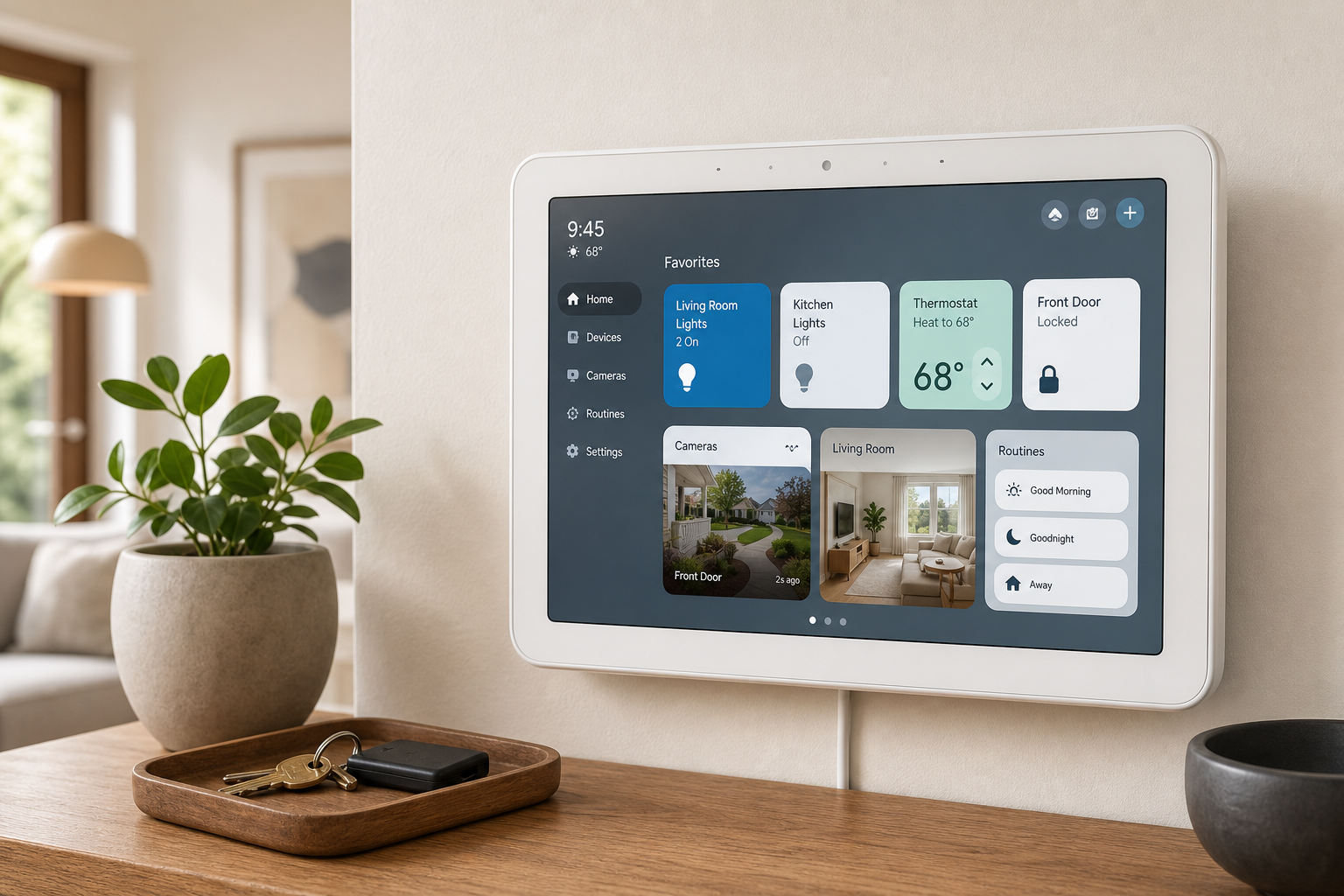
The Echo Hub uses an 8-inch touchscreen (1280 × 800 resolution) in a compact housing roughly 8 × 5.4 × 0.6 inches and about 365 g in weight. It’s designed primarily for wall mounting but can also be placed on a tabletop with compatible accessories. The slim profile helps it blend into hallways, entryways, and living spaces without looking like a bulky tablet.
The front is dominated by the display, surrounded by a relatively thin bezel. A microphone array and speakers are integrated for hands-free Alexa use and audible feedback. Physical buttons are minimal, relying mostly on touch and voice input. Overall, the industrial design leans functional and discreet rather than decorative.
Hardware and Connectivity
Internally, the Echo Hub uses a MediaTek MT8169A processor and includes a range of radios and smart home protocols typically reserved for higher-end hubs:
- Wi‑Fi 5 (802.11ac) for network connectivity
- Bluetooth Low Energy (BLE) for low-power accessories
- Matter support for cross-ecosystem smart devices
- Thread for mesh networking with compatible devices
- Zigbee for many existing bulbs, sensors, and outlets
- Amazon Sidewalk for extended low-bandwidth connectivity in supported areas
This combination allows the Echo Hub to work as a central controller for thousands of compatible smart home devices, including lights, plugs, thermostats, locks, cameras, sensors, and more.
For power, it uses USB (with a supplied power adapter) and also supports Power over Ethernet (PoE) in certain configurations, which can be attractive for clean, always-on wall installations managed by a professional or advanced DIYer.
Display and Audio
The 8-inch touchscreen is optimized for quick glanceability and tap control rather than high-end media consumption. It’s bright enough for indoor use, with sufficient clarity to read tiles and live camera feeds. The interface uses simple tiles, icons, and status indicators.
Dual stereo speakers and a four-microphone array enable typical Alexa functions—playing audio, responding to commands, and allowing two-way communication through compatible cameras or intercom features. However, if you primarily want a music-focused device, some Echo speakers and Echo Show models may deliver richer audio at a similar or lower cost.
Smart Home and Alexa Integration
At its core, the Echo Hub is an Alexa-powered smart home dashboard:
- Device control: Turn lights on/off or dim, toggle smart plugs, adjust thermostats, arm/disarm compatible security systems (such as Ring), and control locks and sensors.
- Camera and doorbell viewing: View live feeds from compatible cameras and video doorbells on the display.
- Automation and routines: Create and trigger Alexa routines based on time, motion, or other device events.
- Multi-standard support: Because it speaks Matter, Thread, Zigbee, Wi‑Fi, BLE, and more, it can unify devices from different manufacturers into a single control surface.
If you’re already invested in the Alexa ecosystem, setup and integration are straightforward. The Alexa app remains central for adding and organizing devices, while the Echo Hub becomes the household control surface that everyone can see and use.
User Experience
Setup and Installation
Out of the box, the Echo Hub guides you through connecting to Wi‑Fi and signing in to your Amazon account. If you already use Alexa, many of your devices and routines appear automatically.
Wall mounting is a key part of the experience. The device ships with a wall mount, anchors, screws, and a template to help you position it. For many users, the most involved step is hiding or routing power cabling so the final installation looks clean. Those who prefer a simpler approach can place it on a shelf or counter using a compatible stand, which trades the built-in wall-panel aesthetic for easier deployment.
Day-to-Day Use
In everyday use, the Echo Hub acts like a smart home dashboard that:
- Shows tiles for rooms and device types (lights, climate, cameras, security, etc.)
- Offers quick-access buttons to run routines or scenes (e.g., "Goodnight," "Away")
- Lets you swipe between views for different parts of the house
Touch interactions are straightforward: tap tiles to toggle devices, slide sliders to dim lights or adjust temperature, and tap camera thumbnails to open live views.
Voice control remains central, especially for multi-step actions. The built-in microphones pick up commands like "Alexa, turn off all the lights in the kitchen" or "Alexa, arm away mode" for compatible systems. Because the Echo Hub is fixed in a known location—often a hallway or entryway—it naturally becomes a household control point where everyone knows they can go to adjust settings.
Performance and Reliability
With its dedicated processor and direct integration with Alexa services, the Echo Hub generally responds quickly to taps and voice commands when network conditions are good. Local connectivity to Zigbee, Thread, and some Matter devices can reduce dependence on cloud round-trips for certain actions, improving reliability and reducing latency, especially for lights and switches.
Of course, overall experience still depends on the stability of your home network and the quality of your connected devices. In larger homes with many devices, the Echo Hub’s support for multiple standards can simplify what would otherwise require several separate hubs.
Pros
- Dedicated smart home dashboard that centralizes control of lights, locks, cameras, thermostats, and more in one always-available location.
- Broad protocol support (Wi‑Fi, Bluetooth LE, Zigbee, Thread, Matter, and Sidewalk), reducing the need for separate hubs for many device brands.
- 8-inch touchscreen designed for quick-glance status and tap control, with a layout optimized for smart home widgets rather than entertainment.
- Strong Alexa integration, including routines, voice control, announcements, and support for compatible security systems.
- Flexible mounting options, including wall mounting with included hardware and the possibility of tabletop use with accessories.
- PoE support (in suitable setups), allowing a single cable for both power and data where supported, which can make for very clean installations.
Cons
- Redundant for simpler homes that only have a few smart bulbs or a single speaker—an Echo Show or basic Echo may be more cost-effective.
- Installation effort can be non-trivial if you care about a clean wall-mounted look and need to route or conceal power cables.
- Audio performance is adequate but not class-leading; dedicated speakers may be better if music is a higher priority than control.
- Best experience assumes Alexa-centric ecosystems; if you primarily use other assistants (Google, Apple), the value diminishes.
- Interface complexity scales with device count—large smart homes can become visually busy, requiring some time to organize rooms and tiles effectively.
Value Assessment
At a typical street price around $179.99, the Echo Hub targets users who see their smart home as infrastructure rather than a collection of novelty devices. For those users—especially in homes with many lights, sensors, locks, and cameras—the cost is easier to justify as it consolidates control and reduces friction across daily routines.
Compared with:
- Standard Echo or Echo Dot: The Echo Hub is much more expensive than a basic smart speaker, but it offers a visual control surface and multiple smart home radios that cheaper speakers lack.
- Echo Show smart displays: Echo Show models give you similar Alexa capabilities with a stronger emphasis on media and general-purpose tablet-style use. The Echo Hub, by contrast, puts its hardware budget into smart home radios and a control-optimized interface instead of entertainment features.
- Professional smart home panels: Many professionally installed control panels cost significantly more and may require proprietary ecosystems or service contracts. The Echo Hub undercuts those while delivering a more consumer-friendly, Alexa-based approach.
For renters or users with modest setups, the value proposition is mixed; a less expensive Echo device may offer enough functionality. Homeowners with extensive or growing device collections, however, are more likely to see the Echo Hub as a worthwhile centerpiece.
Final Thoughts
The Amazon Echo Hub (B0BCR7M9KX) is best understood as a dedicated command center for an Alexa-based smart home. Its combination of an 8-inch touchscreen, broad protocol support, and always-on wall presence makes it well suited for households that want quick, shared access to lighting, climate, security, and automation controls.
If you’re just starting with smart home gear or mainly use a single smart speaker, the Echo Hub may be more than you need. But if you already manage dozens of devices, juggle multiple apps, or want a clean, centralized way for everyone in the home to interact with your setup, this control panel offers a focused, capable solution at a price point that undercuts many professional systems while still feeling purpose-built.