
Introduction
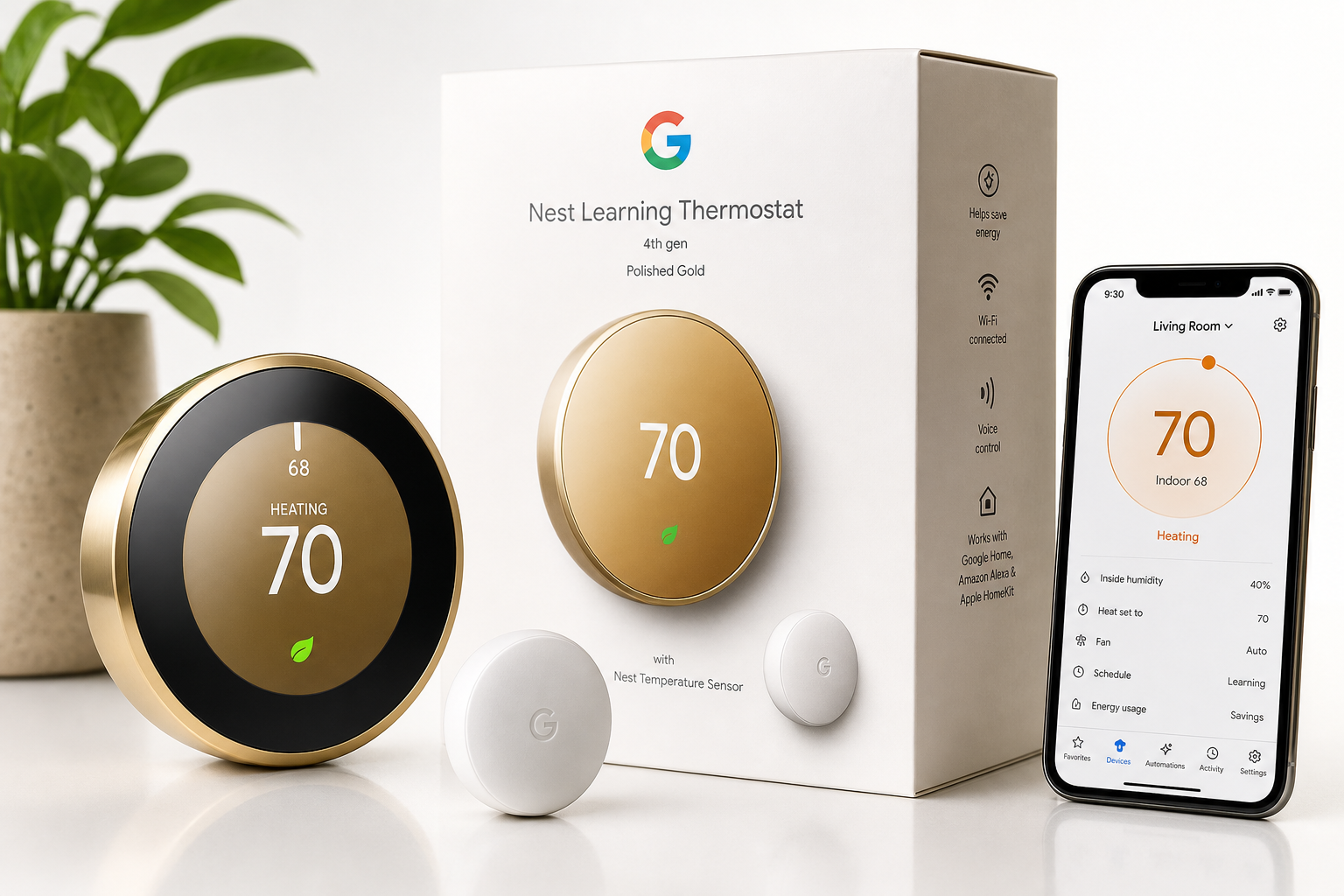
The Google Nest Learning Thermostat (4th Gen, 2024) with Nest Temperature Sensor – Polished Gold targets homeowners who want more than simple temperature control. Building on Nest’s signature learning algorithms, this generation adds tighter integration with Alexa, Apple HomeKit, and the Google Home app, while the bundled Nest Temperature Sensor aims to fix a common thermostat problem: the room where the thermostat is installed rarely matches the room where you actually spend time.
Instead of forcing you to constantly tweak a dial or app slider, the Nest Learning Thermostat observes your schedule, preferences, and occupancy patterns, then automatically optimizes heating and cooling. Combined with energy-saving modes and remote access, it’s designed to provide comfort, control, and potential energy savings with minimal day-to-day effort.
Setup / Getting Started
Unboxing and First Impressions
In the box, you typically find:
- Nest Learning Thermostat (4th Gen) in Polished Gold finish
- Nest Temperature Sensor (2nd Gen)
- Mounting plate and screws
- Optional trim plate (varies by bundle)
- Installation guide and documentation
The Polished Gold finish gives the thermostat a premium, almost jewelry-like appearance. It stands out more as a decor piece than many plain white plastic thermostats, which may be a plus or minus depending on your interior style.
Compatibility and Preparation
Before installing, it’s important to:
- Confirm your HVAC system (heating, cooling, or heat pump) is compatible with Nest’s wiring requirements.
- Identify the existing thermostat wires and label them before removal.
- Ensure you have Wi‑Fi coverage at the thermostat’s mounting location.
- Decide where to place the included Nest Temperature Sensor (for example, bedroom or main living area).
If you’re replacing a standard low-voltage thermostat in a typical U.S. home, installation is generally straightforward, but older systems or unusual wiring configurations may require extra care or professional help.
Physical Installation
- Power off HVAC at the breaker to avoid wiring issues.
- Remove the old thermostat, noting where each wire was connected.
- Attach the Nest base to the wall using the supplied screws and optional trim plate if you want to cover old screw holes or paint marks.
- Connect the labeled wires to the clearly marked terminals on the Nest base.
- Snap the Nest display onto the base until it clicks.
- Restore power, and the thermostat will boot and guide you through on-screen setup.
Most of the configuration happens via the thermostat’s rotating ring and central push-button action: you turn the outer metal ring to navigate, then press inward to select.
Software Setup: App and Smart Home Integration
- Download the Google Home app (or Nest app, if still supported in your region) on your iOS or Android device.
- Add a new device in the app and scan the setup code shown on the thermostat.
- Connect to Wi‑Fi, select your home, and name the thermostat (e.g., "Living Room").
- Enable smart assistant integrations:
- Link to Google Home account for native controls.
- Add to Alexa via the Nest/Google skill.
- Integrate with Apple HomeKit if you use Apple’s ecosystem.
- Pair the Nest Temperature Sensor through the app and assign it to a room.
Once connected, you’ll be able to control temperature, modes, and schedules from your phone or via compatible smart speakers and displays.
Daily Usage
Learning-Based Scheduling
One of the hallmark features of the Nest Learning Thermostat is its ability to observe and adapt to your habits:
- During the first days and weeks, it tracks manual temperature changes.
- It notes what times you leave or return home.
- Over time, it builds a custom schedule that aims to pre-heat or pre-cool your home.
In practice, this means you can start by using it like a regular thermostat—turning the dial when you’re hot or cold—and the device gradually takes over repetitive adjustments.
Room-Level Comfort with the Nest Temperature Sensor
The included Nest Temperature Sensor improves comfort in homes where the thermostat is installed in a hallway or near a drafty area. You can:
- Place the sensor in a frequently used room (e.g., bedroom or family room).
- Tell the Nest which sensor to prioritize at specific times (for example, bedroom at night, living room during the day).
This allows the system to run until the occupied room reaches the target temperature, not just the hallway.
App Control and Remote Access
Through the Google Home app, you can:
- Adjust temperature from anywhere with an internet connection.
- Switch modes (Heat, Cool, Heat•Cool, Eco, Off).
- View current temperature, humidity, and whether the system is actively heating or cooling.
- Temporarily override the learned schedule.
Remote access is especially helpful if you travel—being able to put the house into an efficient Eco mode when you leave and restore comfort before you return adds both convenience and potential savings.
Voice Assistants and Automation
With support for Alexa, Apple HomeKit, and Google Home, the thermostat integrates into multi-platform smart homes. Common voice commands include:
- "Set the living room to 72 degrees."
- "Turn on Eco mode."
- "What’s the temperature in the bedroom?" (when using the sensor).
In automation workflows, you can:
- Trigger temperature changes based on your presence or routines.
- Combine thermostat behavior with smart blinds, fans, or air purifiers.
- Use HomeKit scenes (e.g., "Good Night" scene that lowers temperature and turns off lights).
Performance & Reliability
Temperature Control and Accuracy
The Nest Learning Thermostat monitors both its own internal sensor and the external Nest Temperature Sensor. In typical use:
- Temperature adjustments feel responsive, with the HVAC kicking in quickly when there’s a significant difference from the setpoint.
- The separate room sensor helps smooth out issues caused by sunlight, drafts, or closed doors.
Accuracy will still depend on where you mount the main unit and place the sensor, but having both provides more flexibility than a single fixed sensor.
Learning Algorithms and Eco Features
Nest’s learning and energy-saving features are central to its value proposition:
- Automatic schedule optimization reduces the need for manual programming.
- Eco mode can reduce run time when you’re away.
- Geofencing (location-based presence sensing) uses your phone’s location to help determine when the home is occupied.
Over time, users generally see fewer temperature swings and more consistent comfort with less active management. How much energy you save depends on your home’s insulation, local climate, and behavior, but the intention is to identify when heating or cooling is unnecessary and dial it back.
Connectivity and Smart Home Reliability
Once connected to a stable Wi‑Fi network, the thermostat typically stays online, allowing:
- Reliable remote control
- Prompt responses to app and voice commands
- Integration with other smart devices via routines and automations
Occasional connectivity drops can still occur in homes with weak Wi‑Fi signals near the thermostat; in those cases, relocating your router or adding a mesh Wi‑Fi node near the device can help.
Long-Term Use Considerations
The metal ring and polished finish feel durable, and the circular display has a timeless look carried over from earlier Nest models. Firmware updates are delivered over-the-air, which can introduce new features or compatibility improvements over time, but may also occasionally change the behavior of existing features, so it’s worth revisiting settings after major updates.
What Works Well
-
Learning-Based Automation
The thermostat’s ability to observe your routine and create an automatic schedule can reduce the time you spend manually adjusting settings, especially in households with fairly consistent patterns. -
Room-Level Control with Included Sensor
Bundling a Nest Temperature Sensor adds tangible comfort benefits, allowing you to cool or heat based on where you actually are, not just where the thermostat is mounted. -
Wide Ecosystem Compatibility
Compatibility with Alexa, Apple HomeKit, and the Google Home app makes it a strong choice for mixed-ecosystem homes. -
Premium Design and Build
The Polished Gold finish, rotating metal ring, and clean circular display make it look more like a design object than a standard thermostat. -
Remote Access and Insight
Being able to adjust settings, check status, and review energy-related behavior from your smartphone or tablet provides both convenience and visibility into your home’s climate patterns. -
Energy-Saving Features
Eco modes, scheduling, and presence detection work together to help reduce unnecessary heating and cooling, which can contribute to lower energy usage over time.
What Could Be Improved
-
Installation Clarity for Complex Systems
While the guided install works well for common systems, homeowners with older or more complex HVAC setups may find the wiring diagrams and instructions less clear. More detailed, scenario-based guidance or an expanded in-app wizard would help. -
Granular Manual Scheduling Controls
The learning automation is powerful, but some users prefer explicit, fixed schedules. While manual scheduling is possible, the interface and options could be more granular and easier to manage directly from the app. -
Multi-Zone and Multi-Sensor Logic
Support for multiple sensors is helpful, but more advanced options—for example, averaging multiple rooms, or weighting certain sensors at specific times—would benefit larger homes. -
Dependence on Cloud Services
Many advanced features rely on cloud connectivity. A richer offline mode or more local processing for basic automation would make the system more resilient during internet outages. -
Visibility into Learning Decisions
The thermostat sometimes adjusts the schedule based on inferred patterns, which can feel opaque. Clearer logs or explanations of why it changed a particular setpoint could build user trust.
Overall Impression
The Google Nest Learning Thermostat (4th Gen, 2024) with Nest Temperature Sensor – Polished Gold is a refined smart thermostat aimed at users who want effortless comfort, broad ecosystem compatibility, and thoughtful design.
Its strengths lie in its adaptive learning, energy-aware features, and the bundled temperature sensor that finally acknowledges that comfort is about entire rooms, not just hallways. For households already invested in Google Home, Alexa, or Apple HomeKit, integration is straightforward and powerful.
It’s not the absolute simplest choice for very complex HVAC systems or for those who prefer fully manual control with deep scheduling granularity, and it could benefit from more transparent insight into its automated decisions. However, for most modern homes looking to upgrade from a basic programmable thermostat, this 4th Gen Nest offers a strong combination of intelligence, style, and room-level comfort control.
If you’re seeking a thermostat that largely "just takes care of itself" once installed and configured—while still giving you app and voice control when you want it—the Nest Learning Thermostat 4th Gen with included Nest Temperature Sensor is a compelling option to place at the center of your smart home’s climate strategy.