
Introduction
The Philips WiFi Keypad Deadbolt with Handle is designed as an all-in-one smart entry solution for front doors. Part of Philips’ 4200 Series, it integrates a keyed deadbolt, an exterior handle set, and smart capabilities including built-in 2.4 GHz WiFi, app-based remote control, fingerprint unlocking, voice-assistant compatibility, and flexible access codes.
Unlike some smart locks that require an additional hub or leave you pairing a separate handle with a standalone deadbolt, this model aims to simplify both the appearance and operation of your entryway. It targets homeowners who want keyless entry, remote monitoring, and multi-factor access options while maintaining a traditional handleset form factor.
Setup / Getting Started
Unboxing and Components
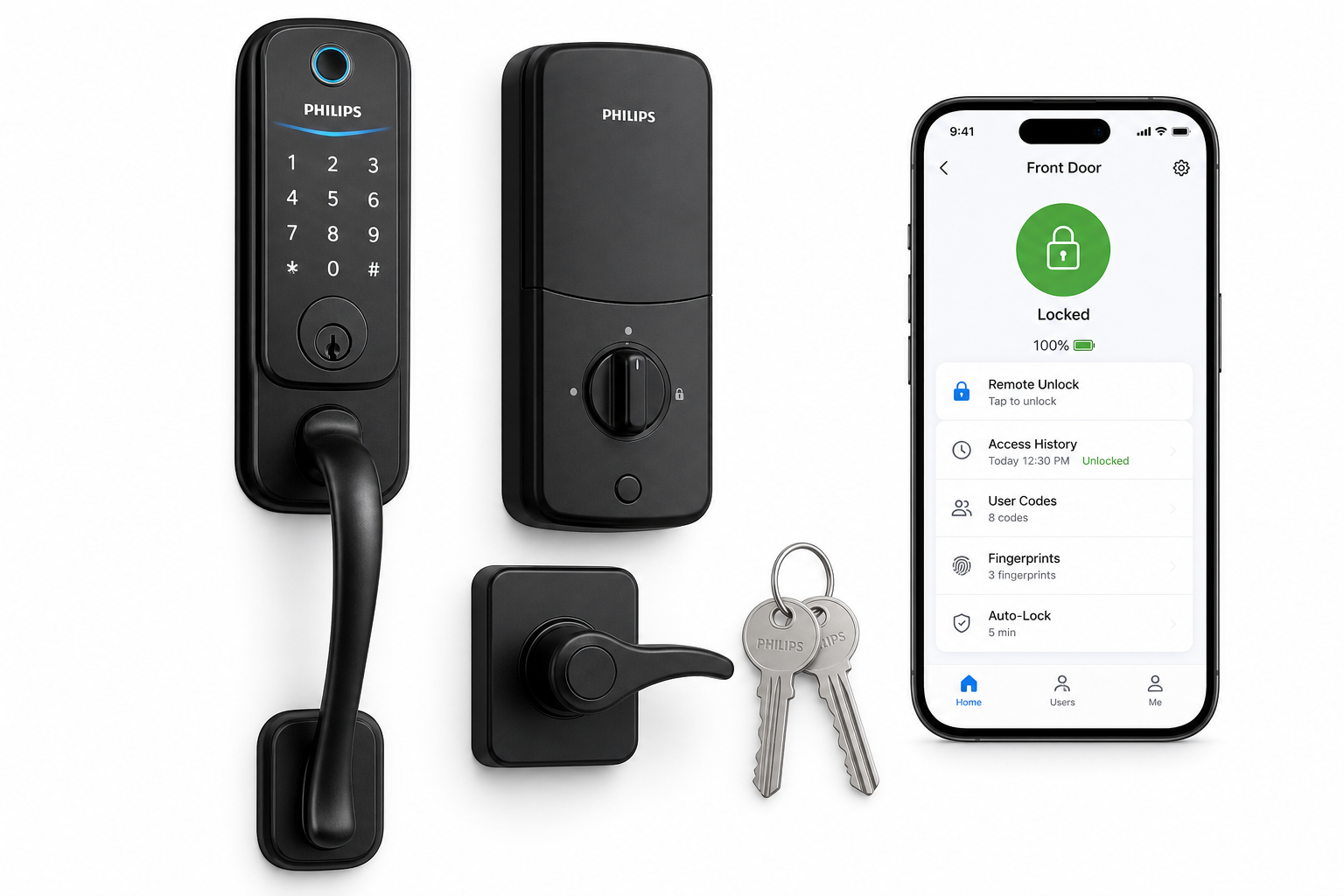
Out of the box, the Philips WiFi Keypad Deadbolt with Handle typically includes:
- Exterior keypad/deadbolt unit with integrated fingerprint sensor
- Interior lock unit with thumb turn and battery compartment
- Exterior handle and matching interior lever
- Strike plates, mounting hardware, and latch
- Installation template and printed quick-start guide
The inclusion of both the deadbolt and handle means you can update the entire front-door hardware in a single project, which helps with visual consistency and finish matching.
Installation Process
Installation is intended for standard U.S. doors with typical thickness and backset. If you already have a traditional deadbolt and handle, you will likely be reusing existing holes:
- Remove existing hardware – Take off your old deadbolt and handle set.
- Prepare the door – Use the included template to confirm hole alignment and size. Minor chiseling may be required if your existing latch or strike plates differ.
- Install the latch and deadbolt – Fit the latch and bolt into the door edge and secure them with screws, ensuring the bolt moves freely.
- Mount the exterior keypad – Feed the cable through the door and align the keypad over the deadbolt hole.
- Attach the interior unit – Connect the cable, secure the mounting plate, then attach the interior cover.
- Install the handleset – Mount the exterior handle and matching interior lever using the existing lower bore.
- Insert batteries – Install the recommended batteries (commonly AA) into the interior unit and power up the lock.
DIY users with basic tools can usually complete the process in under an hour, but doors that are out of spec or previously modified may require extra adjustment to ensure smooth bolt operation.
App Setup and WiFi Connection
Once the hardware is installed, the smart features are activated through the Philips Home Access app:
- Download the Philips Home Access app from your mobile platform’s app store.
- Create or sign in to your account.
- Add a new device and select the appropriate 4200 Series WiFi deadbolt model.
- Put the lock into pairing mode (via keypad sequence or app instructions).
- Connect to 2.4 GHz WiFi – The lock connects directly to your home network, so no hub or bridge is required.
- Finalize configuration – Name the lock (e.g., “Front Door”), set the primary admin code, and update firmware if prompted.
The lock should be installed within a reasonable range of your router (Philips recommends roughly 33 ft / 10 m with minimal obstructions) for stable connectivity.
Daily Usage
Unlocking Options
This lock offers multiple ways to unlock your door, giving flexibility to household members and guests:
- Fingerprint unlock – Place a registered finger on the sensor for quick entry.
- Keypad PIN – Enter a user code on the illuminated keypad.
- Smartphone app – Lock or unlock the door remotely via the Philips Home Access app.
- Voice control – Integrates with supported voice assistants, enabling hands-free control when properly configured.
- Physical key – A traditional key cylinder remains for backup access.
This mix of options is particularly useful for families, short-term rentals, or anyone who needs to accommodate different comfort levels with smart tech.
App Experience
Through the app, you can typically:
- Lock and unlock the door remotely
- View real-time lock status (locked/unlocked)
- Create, edit, and delete user codes
- Register or remove fingerprints
- Review access history to see when and how the door was unlocked
- Adjust auto-lock behavior and other settings
The app becomes the main control center, especially for managing multiple users and tracking access events.
Access Management and Flexible Codes
One of the standout aspects of this product category is flexible access control. With the Philips WiFi Keypad Deadbolt with Handle, you can set:
- Permanent codes for family members or long-term occupants
- Temporary or time-limited codes for guests, service providers, or deliveries
- One-time codes when supported, ideal for occasional access without ongoing permissions
These options reduce reliance on physical keys, make it easier to revoke access when needed, and improve visibility into who uses the lock.
Auto-Lock and Backlit Keypad
The auto-lock feature can automatically secure the door after a set interval, helping prevent accidental unlocked doors. The backlit keypad improves usability at night, ensuring that entering codes is quick and accurate even in low light.
Performance & Reliability
WiFi Stability
Built-in WiFi is a major selling point. Eliminating the need for a separate hub simplifies the installation, but it also means the lock’s connection is only as strong as your 2.4 GHz signal at the door. In typical suburban homes with the router placed centrally, connectivity is generally stable; in larger or more complex layouts, a WiFi extender near the entryway may help.
When the connection is stable, remote commands (lock/unlock) and status updates arrive within a few seconds. If WiFi drops, the lock continues to function locally via keypad, fingerprint, and key, but app features like live status and remote control will be limited until the connection is restored.
Biometric and Keypad Accuracy
Fingerprint sensors on consumer locks can vary in responsiveness. When fingers are clean and dry, recognition is usually quick and reliable. Wet, dirty, or very cold fingers may require a second try, which is common for this category of product. The keypad offers a dependable fallback, especially useful for children or guests who prefer a code.
Battery Life
Battery life will depend on usage intensity, WiFi signal quality, and environmental conditions. Built-in WiFi can draw more power than Bluetooth-only solutions, so it is normal to expect somewhat more frequent battery changes than with non-WiFi models. The lock typically provides low-battery warnings through the app and/or audible or visual alerts on the lock itself, giving you time to replace batteries before power runs out.
Mechanical Reliability
Mechanically, performance depends significantly on proper installation. A well-aligned door and strike plate result in smooth bolt movement and quiet operation. Doors with sagging hinges or misaligned frames can cause extra friction, which may affect the perceived reliability of the lock. Ensuring your door closes cleanly and latches easily is essential for long-term performance.
What Works Well
- All-in-one handleset and deadbolt Combining a smart deadbolt with a matching exterior handle and interior lever yields a cohesive look and simplifies hardware selection for front doors.
- Built-in WiFi (no hub required) Direct 2.4 GHz WiFi connectivity removes the need for additional hardware, reducing system complexity and potential points of failure.
- Multiple access methods Fingerprint, keypad, app, voice, and traditional key options cater to different user preferences and provide redundancy.
- Flexible access codes and management The ability to create, schedule, and revoke codes via the app is valuable for households, rental properties, and home offices.
- Auto-lock and backlit keypad These safety and convenience features help ensure doors are not left unlocked and that entry remains easy in low-light conditions.
- Modern, unified design The integrated handleset provides a streamlined aesthetic that feels purpose-built for smart-home front entries rather than pieced together.
What Could Be Improved
- WiFi range sensitivity As with most built-in WiFi locks, performance is closely tied to signal strength. Homes with weak 2.4 GHz coverage near the door may need additional networking gear for optimum reliability.
- Installation learning curve for first-time DIYers While the instructions are straightforward, users unfamiliar with door hardware may find aligning the deadbolt, latch, and handleset challenging on older or nonstandard doors.
- Battery consumption Continuous WiFi connectivity can reduce battery life relative to Bluetooth-only models. Power users may appreciate clearer battery life expectations and best-practice guidance within the app.
- Advanced configuration feedback More granular feedback or troubleshooting steps in the app (for WiFi signal strength, error states, or door alignment issues) would help less technical users diagnose problems without guesswork.
Overall Impression
The Philips WiFi Keypad Deadbolt with Handle is a strong option for anyone looking to modernize their front door with a full-featured smart lock and matching handleset. Its combination of built-in WiFi, multiple unlock methods (including fingerprint), flexible access codes, auto-lock, and a backlit keypad makes it well-suited for busy households, frequent guests, or light rental scenarios.
Those with stable 2.4 GHz WiFi at the door and a reasonably standard door configuration are likely to have the best experience. Prospective buyers should account for careful installation and occasional attention to WiFi coverage and battery changes, but in return gain a more convenient, controllable, and trackable entry experience than with traditional locks.
For users prioritizing remote control, keyless convenience, and an integrated door-hardware look, this Philips 4200 Series WiFi keypad deadbolt with handle is a compelling smart-lock candidate.