
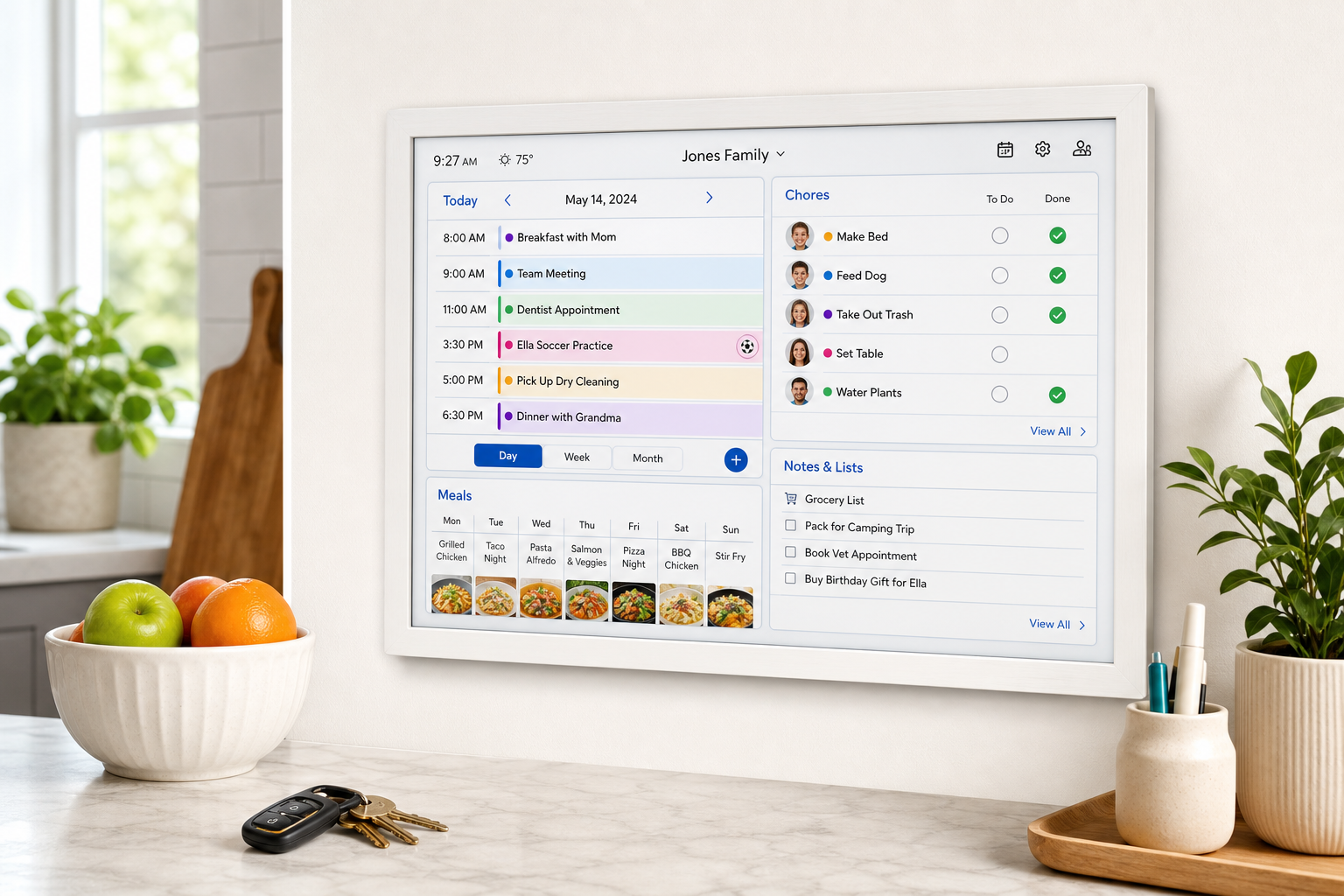
Skylight 15-Inch Digital Wall Planner & Chore Chart Review
Introduction
The Skylight Calendar 15-inch Wall Planner is a dedicated digital calendar and family organizer designed to live on a kitchen wall, hallway, or command-center space. With a 15.4-inch touchscreen, Wi-Fi connectivity, and a purpose-built interface, it combines shared schedules, chore tracking, and meal planning into a single always-on display.
Rather than relying on a mix of paper calendars, phone apps, and ad‑hoc whiteboards, Skylight aims to centralize everything in one glanceable hub for the entire household.
Note: At the time of writing, the Skylight Calendar 15-inch model typically sells for around $299.00 on Amazon, but pricing often fluctuates with sales and promotions.
Key Points
- 15.4-inch full‑HD touchscreen designed specifically for wall mounting or countertop use.
- Central family hub for schedules, chores, and meal planning in one interface.
- Calendar sync support for Google, iCloud, Outlook, Cozi, Yahoo and more via Wi‑Fi.
- Color‑coded profiles so each family member’s events and chores are easy to distinguish.
- Interactive chore chart with progress tracking for kids and adults.
- Meal planner view for weekly dinners and basic meal organization.
- Multiple calendar views (day, week, month) optimized for readability at a distance.
- Companion mobile app for adding events, editing chores, and managing content remotely.
- Simple physical design with included wall-mount hardware and optional stand.
Experience
Design and Build
The Skylight Calendar 15-inch unit is essentially a slim, modern display wrapped in a clean frame that resembles a digital photo frame more than a computer monitor. At roughly 10 inches wide and just over an inch deep, it sits close to the wall and looks intentional rather than like a repurposed tablet.
The frame and chassis feel solid, and the included mounting hardware simplifies installation. For renters or anyone hesitant to drill, it can also be propped up on a counter using a stand (depending on kit or accessory options), though it feels most at home mounted at eye level in a kitchen or entryway.
Setup and Connectivity
Initial setup is straightforward:
- Mount or place the device where it will live.
- Connect to Wi‑Fi using the touchscreen prompts.
- Link calendars (Google, iCloud, Outlook, Cozi, Yahoo) through the Skylight app or web interface.
- Create family profiles and assign each person a color.
Within minutes, existing events appear on the screen. For households already living in shared Google or iCloud calendars, this is where Skylight immediately shines: it becomes a passive, always‑visible window into calendars that were previously buried in phones.
Everyday Use as a Calendar
Skylight offers multiple views (day, week, month), and the layout is tuned for legibility from across the room. Color-coded event blocks make it easy to see whose activity is whose at a glance, which helps during busy mornings when everyone is checking what’s happening after school or work.
Key strengths in daily use:
- Readable from a distance: The fonts, spacing, and color blocks are large enough for quick scans from several feet away.
- Touch interactions: Tapping to drill down into an event, swipe between days or weeks, and create new events feels intuitive.
- Two-way sync (where supported): Changes made on your phone appear on Skylight, and certain changes made on Skylight propagate back to connected calendars, reducing double entry.
Chore Chart and Task Management
One of the main differentiators versus a generic tablet is the built‑in chore chart. You can create profiles for each family member, then assign daily, weekly, or custom chores.
In practice, families tend to use this for:
- Morning and bedtime routines for kids.
- Weekly tasks like taking out trash or cleaning rooms.
- Shared responsibilities such as pet care or dishes.
On the display, kids can tap chores to mark them complete, providing a clear visual of what’s pending. Parents can audit progress at a glance, and because it’s on the wall, it becomes part of the household routine rather than something hidden in an app.
Meal Planning and Lists
Skylight also includes basic meal planning tools. You can set dinners (and optionally other meals) for each day of the week so everyone can see what’s on the menu. While it doesn’t replace a full-featured recipe manager or grocery app, it works well as a high‑level meal board.
Many households pair this with a grocery list or to‑do list on the same device, maintaining a lightweight command center without needing separate boards.
Performance and Reliability
For a device that’s meant to be always on, performance and stability are more important than raw speed. The Skylight Calendar 15-inch generally wakes quickly, transitions smoothly between views, and handles ongoing calendar sync in the background.
Wi‑Fi reliability will depend on your home network, but once connected, the device is largely hands off. Occasional cloud updates introduce incremental improvements to layouts, features, or integrations, extending the product’s usefulness beyond the initial purchase.
Compared to Alternatives
Versus a mounted tablet: You can approximate a wall calendar with an iPad or Android tablet running a calendar app, but this usually requires more setup, more maintenance, and dealing with a less optimized layout for large, at-a-distance viewing. Skylight’s focus on large event blocks, family profiles, and built-in chore and meal tools makes it more out-of-the-box.
Versus a paper calendar or whiteboard: Paper is inexpensive and simple but easy to forget to update and impossible to sync with digital calendars. Skylight’s value is in automatically staying current with your phone-based schedules while remaining visible to everyone.
Versus larger smart calendars: Skylight also offers a larger 27-inch version and there are competing large displays, but they cost significantly more. The 15-inch hits a balance between screen size, price, and footprint that works for most kitchens and hallways.
Pros
- Purpose-built family organizer rather than a general tablet, reducing distraction and complexity.
- Good screen size and clarity for viewing schedules from across the room.
- Broad calendar integration (Google, iCloud, Outlook, Cozi, Yahoo) to centralize existing digital calendars.
- Color-coded profiles make it easy to see each person’s events and chores.
- Interactive chore chart encourages kids’ participation and provides simple visual accountability.
- Integrated meal planner for basic weekly planning.
- Simple, modern design that looks like a frame, not a computer.
- Relatively quick setup with an intuitive interface and companion app.
- Regular software updates that can add or refine features over time.
Cons
- Price is premium compared to a basic wall calendar or repurposed tablet, even when discounted from the typical $299.00 range.
- Requires Wi‑Fi and cloud services; not ideal for users who prefer offline-only tools.
- Limited app ecosystem by design—great for focus, but you can’t install arbitrary apps.
- Subscription considerations for some advanced or photo features (depending on plan and region) may add ongoing cost.
- Not a full smart display replacement; it won’t fully substitute an Echo Show or similar device for voice assistants, streaming, etc.
Verdict
The Skylight Calendar 15-inch Wall Planner is a thoughtfully designed solution for families who want an always‑visible, centralized view of their schedules, chores, and meals. Its main strengths lie in doing a small number of things very well: calendar display, chore tracking, and basic meal planning—without the distractions or complexity of a general-purpose tablet.
If your household already lives in shared digital calendars but still relies on paper on the fridge to keep everyone aligned, Skylight is a strong upgrade. The biggest trade‑off is cost: compared with free apps and low‑tech tools, the hardware and potential subscription fees represent a meaningful investment. For busy families who value a clean, dedicated command center and are comfortable with cloud-connected devices, however, the Skylight Calendar 15-inch makes a compelling case as the new default family hub.
For more details or the latest pricing, refer to the product page on Amazon: $299.00 is often a ballpark, but current deals may vary on the listing at https://www.amazon.com/dp/B0C9V811L6.