
Introduction
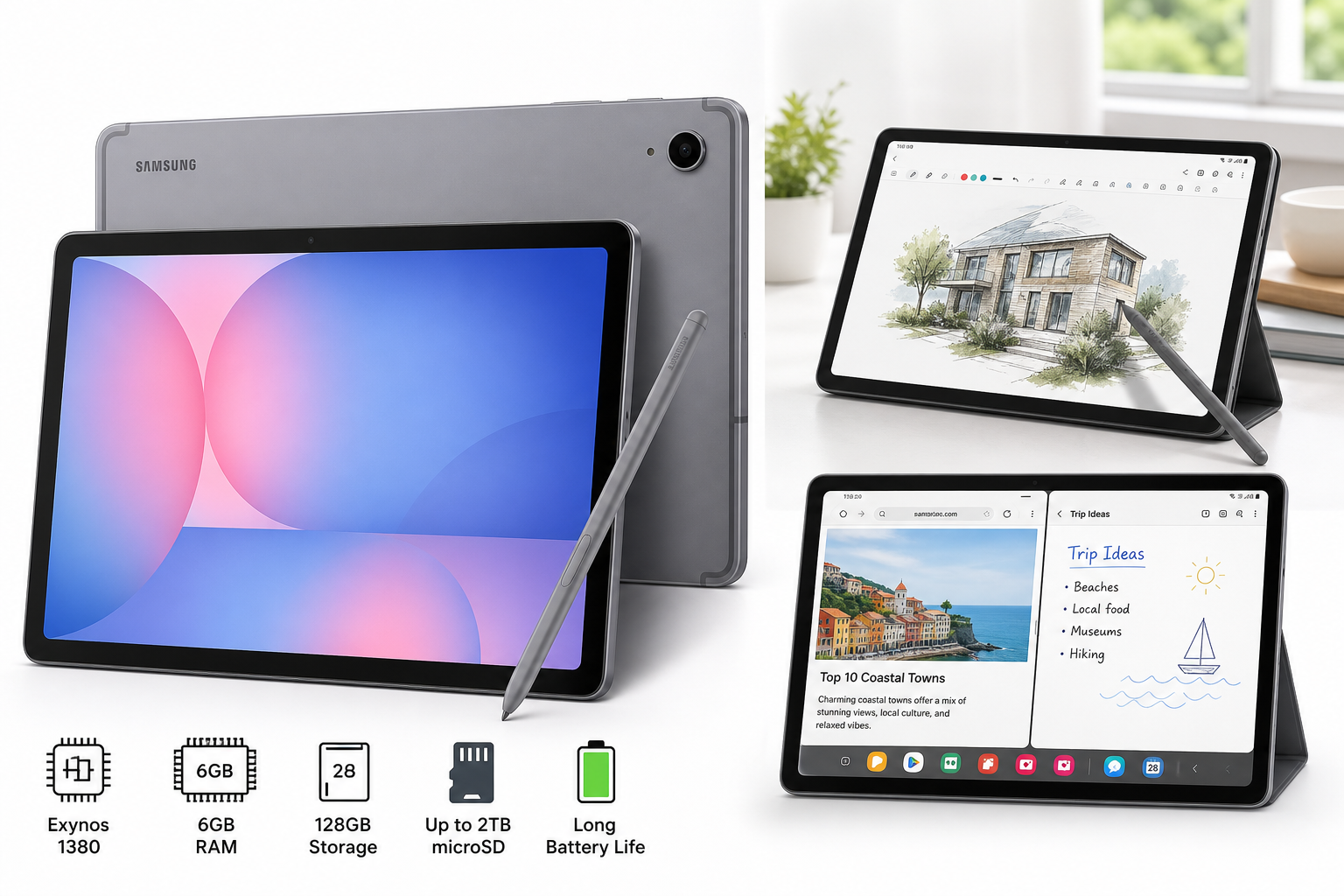
The Samsung Galaxy Tab S10 Lite (6GB RAM, 128GB, 10.9" LCD, Gray) is designed as a flexible, midrange tablet that can handle work, study, and entertainment in a single device. It pairs Samsung’s Exynos 1380 processor with 6GB of RAM, 128GB of internal storage, and support for up to 2TB via microSD expansion, giving it a performance and capacity edge over many budget Android tablets.
Samsung includes an S Pen in the box, enabling precise note‑taking, sketching, and annotation. The 10.9‑inch LCD display, long battery life, and software features like Circle to Search and other Galaxy AI tools aim to deliver some of the premium Galaxy experience at a more accessible price point of $399.99.
This review focuses on how the Galaxy Tab S10 Lite behaves in realistic day‑to‑day use: productivity, media consumption, reading, light creative work, and casual gaming.
Typical Use Cases
1. Note‑Taking, Studying, and Meetings
With the bundled S Pen and Samsung Notes, the Tab S10 Lite is positioned as a digital notebook and study companion. Likely usage scenarios include:
- Handwritten lecture or meeting notes
- Annotating PDFs, slides, and documents
- Using split‑screen to keep a textbook or browser on one side and notes on the other
- Quick sketches or whiteboard‑style brainstorming
2. Media Consumption and Casual Browsing
The 10.9‑inch LCD and stereo speakers make the tablet suitable for:
- Streaming video from services such as YouTube and major streaming platforms
- Social media browsing and web reading
- Viewing photos and basic photo edits
3. Light Productivity and Multitasking
Running Android with Samsung’s One UI, the Tab S10 Lite is aimed at users who want occasional productivity without needing a full laptop:
- Email triage and document review
- Web‑based work apps and collaboration tools
- Split‑screen multitasking and pop‑up windows for quick reference
Paired with a Bluetooth keyboard and mouse, it can take on light document and spreadsheet work.
4. Casual Gaming
The Exynos 1380 chip is midrange, so the expected use case is casual and mid‑intensity gaming, rather than high‑end 3D gaming at maximum settings. Puzzle games, 2D platformers, card and strategy games, and many popular online titles should run comfortably.
5. On‑the‑Go Companion Device
The combination of a relatively slim chassis, long battery life, and expandable storage makes the Tab S10 Lite a potential travel companion:
- Offline video, music, and ebook library
- Basic photo backup from a phone or camera (via cloud or adapters)
- Navigation and trip planning when Wi‑Fi is available
Performance in Each Scenario
Note‑Taking and Study Workflows
The inclusion of the S Pen is one of the differentiating features at this price point. Latency is low enough for comfortable handwriting, and palm rejection is generally reliable on Samsung’s tablets. For students and professionals who primarily write notes, annotate PDFs, or mark up documents, the experience is more than adequate.
The 6GB of RAM is sufficient for typical study workloads, such as keeping multiple browser tabs, a note‑taking app, and a PDF open at the same time, without aggressive app closing. The 128GB internal storage, plus expandable microSD up to 2TB, provides plenty of space for downloaded lectures, reference PDFs, and offline media.
Media Consumption
The 10.9‑inch LCD offers a comfortable size for video and reading. Color and brightness should be solid for indoor use and acceptable outdoors in shade, though it is not on the same level as Samsung’s OLED displays on higher‑end Galaxy Tab S models. For streaming in bed, at a desk, or on a couch, the screen size and aspect ratio work well.
The built‑in speakers on Samsung midrange tablets are typically tuned for clarity and dialogue rather than deep bass. They should be entirely adequate for casual viewing and video calls, with headphones (wired via USB‑C adapter or Bluetooth) recommended for more immersive listening.
Light Productivity and Multitasking
Powered by the Exynos 1380, the Tab S10 Lite is optimized for everyday responsiveness rather than raw compute. Routine tasks such as email, document viewing, video calls, and web apps tend to be smooth on this class of hardware. The 6GB RAM budget is adequate for typical tablet productivity workflows, but not ideal for very heavy multitasking or running many complex apps in the background.
Samsung’s multitasking features—multi‑window, pop‑up views, and taskbar‑style navigation on newer One UI versions—add flexibility. Running two apps side by side (for example, a browser and a note‑taking app, or video call and notes) is practical, though pushing beyond two or three active windows can start to strain memory.
Gaming and Graphics
The Exynos 1380 GPU can handle casual and many mainstream 3D games at medium settings. Titles that are well‑optimized for Android should run smoothly, particularly at modest graphics profiles. However:
- Demanding 3D games may require dropping resolution or detail settings to maintain consistent frame rates.
- Extended gaming sessions can raise device temperature and lead to mild thermal throttling, a common trait in midrange mobile SoCs.
For users whose primary goal is high‑refresh, max‑detail gaming, a more gaming‑oriented tablet or a higher‑end Galaxy Tab S model would be more appropriate.
Battery Life and Mobility
The Tab S10 Lite is marketed with long battery life, and Samsung’s midrange tablets typically perform well in mixed use. Under realistic workloads—web browsing, streaming, note‑taking, and occasional gaming—users can reasonably expect a full day of moderate use on a single charge, with lighter use stretching into multiple days.
Charging speeds are generally in the midrange category: not as fast as some dedicated fast‑charge phones, but adequate for topping up during the day. The device is reasonably slim and light for a 10.9‑inch tablet, making it comfortable to hand‑hold for reading or to prop up with a stand case.
Galaxy AI and Circle to Search
One of the standout software aspects is the presence of Galaxy AI tools, including Circle to Search. These features are intended to enhance everyday interactions rather than act as headline‑grabbing gimmicks:
- Circle to Search allows you to circle part of the screen to quickly get contextual information about what you’re viewing—useful for shopping, research, or identifying places and objects.
- Other AI tools may assist with summarization, translation, and content assistance, helping with study and research workflows.
On a midrange chip like the Exynos 1380, some AI tasks are offloaded to the cloud. As a result, responsiveness can vary with network conditions, and heavy AI usage may not be as instantaneous as on top‑tier flagship hardware.
Strengths Across Scenarios
-
Balanced Midrange Performance
The combination of Exynos 1380 and 6GB RAM hits a practical sweet spot for most non‑specialist users. Everyday tasks—web browsing, email, streaming, note‑taking, office apps—are handled confidently without frequent slowdowns. -
S Pen Included
Having the S Pen in the box significantly increases value for students and professionals compared to tablets where a stylus must be purchased separately. The pen experience on Samsung tablets is generally mature, with refined palm rejection and strong integration throughout One UI. -
Expandable Storage up to 2TB
Support for large microSD cards is valuable for users who maintain extensive offline libraries of video, music, or reference documents. It helps offset the fixed 128GB internal storage and offers flexibility as needs grow. -
Galaxy AI Features on a Midrange Device
Bringing features like Circle to Search and AI‑powered assistance down to a Lite model gives users a taste of Samsung’s more advanced software ecosystem without the cost of a flagship tablet. -
Long Battery Life
All‑day endurance under mixed use makes the Tab S10 Lite a reliable device for commutes, classes, or office days, reducing dependence on power outlets. -
Reasonable Value for Feature Set
At around $399.99 for a 10.9‑inch tablet with S Pen, decent performance, expandable storage, and Galaxy AI tools, the Tab S10 Lite tends to sit in an attractive position between budget models and premium Galaxy Tab S flagships.
Limitations Across Scenarios
-
LCD vs OLED Display
The 10.9‑inch LCD is serviceable and sharp, but it lacks the deep blacks, contrast, and overall punch of Samsung’s AMOLED panels on higher‑end tablets. For users prioritizing HDR movie watching or color‑critical creative work, this is a compromise. -
Midrange SoC Ceiling
While the Exynos 1380 is capable, it is not a flagship chip. Heavy multitasking, demanding 3D titles, or intensive creative workloads (e.g., complex layered drawing apps, video editing) can expose its limits. -
6GB RAM Constraint for Power Users
For general users, 6GB is fine. For heavier users who keep many apps and browser tabs open, or who rely heavily on multitasking features, there may be occasional app reloads and slower app switching. -
Software Support Window (vs. Flagships)
Samsung has a strong track record on Android updates, but midrange and Lite devices historically may receive a slightly shorter or delayed update schedule compared to the very top‑tier Galaxy devices. Buyers expecting flagship‑level long‑term support should confirm current update policies at the time of purchase. -
Accessory Ecosystem
While Samsung’s tablets usually have a decent third‑party case and accessory ecosystem, availability of premium keyboard covers or specialized accessories can lag behind more mainstream or flagship models. Users who want a laptop‑like experience should verify compatible keyboard covers and stands.
Verdict
The Samsung Galaxy Tab S10 Lite is a thoughtfully balanced midrange tablet that emphasizes versatility and practicality. Its key strengths—bundled S Pen, capable Exynos 1380 performance, long battery life, and expandable storage—make it well‑suited for students, casual professionals, and home users who want a single device for note‑taking, streaming, light productivity, and everyday browsing.
It is not aimed at heavy gamers or users who demand OLED‑class displays and top‑tier processing power. Instead, it delivers a well‑rounded, comfortable experience in the tasks most people perform daily, while adding the bonus of Galaxy AI tools and Circle to Search.
If you are looking for a 10.9‑inch Android tablet that includes a stylus, handles everyday workloads reliably, and offers room to grow with microSD expansion, the Galaxy Tab S10 Lite is a strong contender in the midrange segment, especially when found near its typical pricing around $399.99.
For more details or to check current availability and configurations, refer directly to the product page:
- Samsung Galaxy Tab S10 Lite on Amazon: https://www.amazon.com/dp/B0FF5JJ3CP