
1. Introduction
Traditional mechanical door locks rely entirely on physical keys, bringing risks of key loss, copying, and inconvenient temporary access management. Modern smart deadbolts upgrade home security by integrating multiple keyless entry modes, remote control, intelligent access scheduling, tamper detection, and smart home automation. With a wide range of models varying in security grading, biometric support, ecosystem compatibility, and build quality, consumers often struggle to distinguish premium secure models from low-grade budget alternatives. This guide breaks down every essential specification, core feature, and real-world use case to help buyers select the most reliable smart lock for their home, rental property, or apartment.
2. Core Security Grade & Hardware Standard 🛡️
2.1 ANSI/BHMA Security Rating
Security grade is the most fundamental benchmark determining a smart lock’s burglary resistance. Grade 1 is the highest commercial standard, featuring reinforced steel bolt, anti-saw cylinders, 20-minute fire resistance, and strong anti-pry, anti-kick, and anti-drill protection. These locks are ideal for primary front doors and high-security residential applications.
Grade 1 residential variants and Grade 2 models offer reliable daily security for secondary doors, back entries, and rental units, with decent anti-breach performance but weaker extreme force resistance compared to commercial-grade hardware. Budget Grade 3 locks feature lightweight construction and are only suitable for low-risk interior doors, not exterior entryways.
2.2 Build Material & Anti-Tamper Design
High-quality smart deadbolts adopt full zinc alloy and stainless steel internal structures, preventing bolt bending, drilling, and lock picking. Premium models integrate built-in forced entry alarm systems that trigger vibration alerts and instant phone push notifications when prying, drilling, or lock bumping is detected.
Essential anti-theft designs include anti-peep keypad technology, shielded key cylinders, and reinforced bolt throw length. Anti-peep keypads prevent shoulder surfing by allowing random dummy digit input, effectively blocking code theft from bystanders.
3. Keyless Entry Methods & Daily Convenience 🔐
3.1 Multi-Mode Access Options
Modern smart locks support diverse entry methods to adapt to different daily scenarios. Basic models offer app remote unlock, custom keypad passcodes, and physical key backup. Mid-range and premium upgrades add high-convenience access including fingerprint recognition, Bluetooth auto-unlock proximity mode, and digital wallet tap-to-unlock keys exclusive to Apple ecosystems.
Fingerprint Access provides fast hands-free entry in under 0.5 seconds, perfect for users carrying groceries or children. High-capacity fingerprint storage supports multi-person households and frequent guest access.
Apple Home Key allows iPhone and Apple Watch users to unlock by simple tap, with end-to-end encrypted key storage and no risk of key duplication, delivering the most seamless premium smart entry experience.
Scheduled Passcodes & eKeys enable time-limited temporary access for cleaners, dog walkers, contractors, and Airbnb guests, with automatic expiration and real-time access logs.
4. Connectivity & Smart Home Ecosystem Compatibility 🛜
4.1 WiFi, Bluetooth & Mesh Connection
Built-in 2.4GHz WiFi enables direct remote control without external hubs, supporting real-time status checking and remote unlock from anywhere. Dual-band WiFi offers more stable connection in crowded smart home networks. Bluetooth serves as local backup access during WiFi outages to prevent lockout.
Mesh and Matter-certified locks deliver stronger whole-home connectivity, supporting stable multi-device automation and cross-brand smart home linkage.
4.2 Voice & Platform Support
Mainstream smart locks support Amazon Alexa and Google Assistant voice control for voice locking and status inquiry. Premium models add native Apple HomeKit and Siri integration, fully adapting to iOS and macOS smart home workflows. High ecosystem compatibility allows smart lock linkage with security cameras, smart lights, and alarm systems for automated home security routines.
5. Power System & Emergency Backup ⚡
Most smart locks run on standard AA batteries with 3–6 months of runtime per replacement. Reliable low-battery reminders prevent sudden power failure lockouts. A critical difference between premium and budget models lies in emergency backup design.
Budget and mid-range locks rely solely on physical key backup once batteries die. Advanced smart locks integrate external USB emergency power ports, allowing users to power the lock temporarily via power banks to unlock the door without physical keys, completely solving dead-battery lockout risks.
6. Core Practical Features for Different Scenarios 🎯
6.1 For Homeowners & Primary Front Doors
Prioritize commercial-grade security, forced entry alarm, stable remote access, and long-term mechanical warranty. Apple ecosystem users should select Home Key-compatible models for premium tap-to-unlock convenience. Anti-tamper alerts and detailed access logs provide full home security monitoring.
6.2 For Renters & Apartment Dwellers
Choose easy-install no-drill smart deadbolts with removable designs. Prefer models with anti-peep keypads, auto-lock functions, and subscription-free local operation. Avoid permanently modified hardware to comply with rental property rules, and prioritize budget-friendly replaceable designs.
6.3 For Airbnb & Short-Term Rental Hosts
Focus on large-capacity scheduled passcodes, one-time guest eKeys, automatic code expiration, and complete access history records. High-grade security and weather-resistant exterior finishes ensure long-term durability for high-frequency guest use.
7. Warranty & Durability Standards 🛡️
Premium smart lock brands provide lifetime mechanical and finish warranty, covering structural failure and exterior fading. Electronic components usually come with 3-year premium warranty or 18-month standard warranty. Weatherproof IP ratings ensure stable operation under rain, snow, and extreme temperature changes for outdoor front door installation.
8. Common Buying Mistakes & Pitfalls ❌
- Overlooking security grading: Many budget smart locks adopt low residential Grade 2/3 hardware with weak anti-breach performance, unsafe for exterior front doors.
- Ignoring emergency backup solutions: Locks without USB emergency power will cause lockouts once batteries drain completely.
- Blindly pursuing biometrics: Fingerprint functions are unnecessary for Apple users who fully utilize Home Key tap-to-unlock.
- Neglecting ecosystem matching: Purchasing non-HomeKit locks for Apple homes results in limited smart automation functionality.
- Underestimating weather resistance: Non-weatherproof models easily fade or malfunction under outdoor extreme weather.
9. Budget Tier Classification & Value Selection 💰
9.1 Entry-Level Budget ($100–$180)
Philips WiFi Keypad Door Lock $109.99
Basic WiFi remote control, keypad codes, standard auto-lock, and physical key backup. Suitable for apartments, interior doors, and casual users with simple security needs. Limited anti-tamper performance and no advanced biometrics or emergency USB power.
9.2 Mid-Range Balanced ($180–$280)
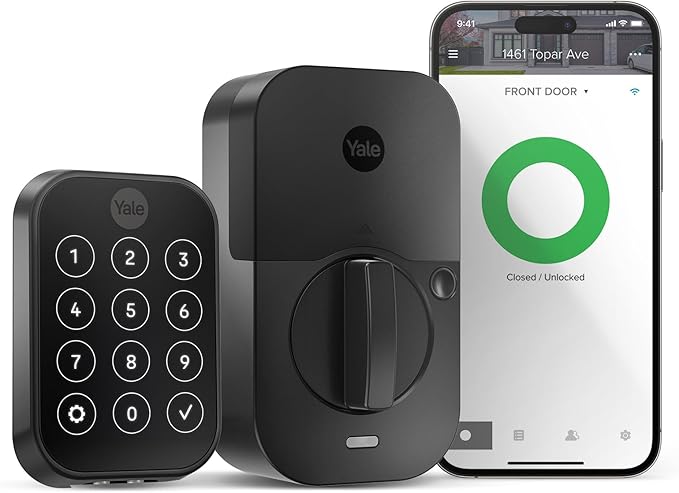
Yale Smart Deadbolt with Wi-Fi, Touchscreen Keypad, Keyless Entry Door Lock $223.99
Multi-mode access including fingerprint or proximity auto-unlock, anti-peep keypad, IP65 weather resistance, and dual voice assistant support. Provides the best cost performance for most family homes, balancing convenience and daily security.
9.3 Premium Flagship ($280+)
Lockly Visage Zeno Series Smart Lock, Facial Recognition & Fingerprint Keyless Entry Door Lock $339
Commercial Grade 1 security, Apple Home Key tap-to-unlock, forced entry alarm, large-capacity scheduled codes, lifetime mechanical warranty, and full smart home ecosystem integration. Designed for high-security primary doors, luxury homes, and professional rental property management.
10. Final Verdict & Buying Recommendation
The ideal smart lock depends on matching security grade, entry modes, and ecosystem support to personal living scenarios. Ordinary family users can choose mid-range multi-mode smart locks for balanced performance and affordability. Apple ecosystem enthusiasts and security-focused homeowners should invest in premium HomeKit-compatible commercial-grade deadbolts for maximum safety and convenience. Renters and budget users can select reliable entry-level models with basic keyless functions without overpaying for unnecessary premium features. Regardless of budget, buyers should always prioritize solid build quality, anti-tamper protection, and practical emergency backup functions to ensure long-term home security stability.