
Quick Summary
The Pulcro.io TK Node Mini PC - Home Assistant preinstalled, AMD Ryzen R2314 (4C/4T), 8GB RAM, 256GB SSD is positioned as a compact infrastructure box for smart homes, home labs, and small self‑hosted services.
It combines:
- An AMD Ryzen Embedded R2314 (4 cores / 4 threads) CPU
- 8GB DDR4 RAM
- 256GB M.2 2280 SSD
- Home Assistant OS preinstalled for true plug‑and‑play setup
- Dual M.2 storage support and two SO‑DIMM slots for future expansion
- Triple 4K display output plus Wi‑Fi 6 and Gigabit Ethernet
At around $222.00 on Amazon (for the R2314, 8GB RAM, 256GB SSD, Home Assistant configuration), it is clearly aimed at users who want a reliable, always‑on Home Assistant machine with enough headroom for add‑ons, light containers, and modest home lab workloads—without diving into barebones hardware and manual OS installs.
Detailed Analysis
Hardware Design and Build
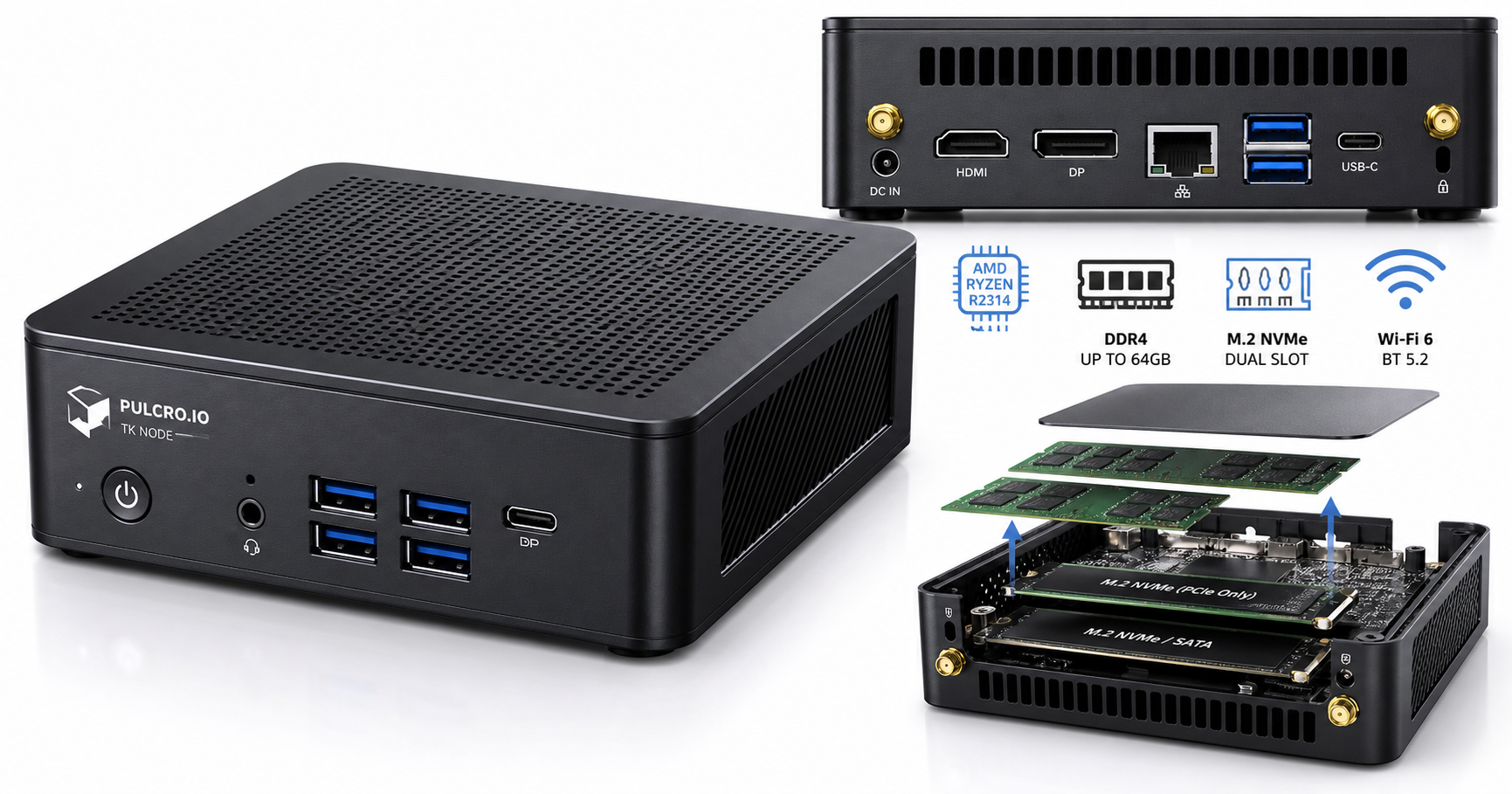
The TK Node uses a compact 5" x 5" x 1.7" chassis with a simple, utilitarian design that’s more focused on function than aesthetics. The footprint is similar to a small NUC‑style PC, making it easy to tuck behind a monitor, into a rack shelf, or on a networking shelf near your router.
Key hardware characteristics:
- CPU: AMD Ryzen Embedded R2314 (up to 3.5 GHz, 4 cores / 4 threads)
- Memory: 8GB DDR4 SO‑DIMM (user‑upgradeable; two slots, up to 32–64GB depending on configuration)
- Storage: 256GB M.2 2280 SSD installed, with support for dual M.2 slots (one NVMe‑only, one NVMe + SATA) so you can add a second drive later
- Graphics: Integrated AMD Radeon graphics with support for up to three 4K displays (HDMI, DisplayPort, USB‑C DP)
- Connectivity:
- 1x Gigabit Ethernet (Realtek 8111H)
- Wi‑Fi 6 and Bluetooth 5.2
- 6x USB 3.2 Type‑A ports
- 1x USB‑C with DisplayPort
- 1x HDMI 2.1, 1x DisplayPort 1.4
- 3.5mm audio jack
- Power: 19V / 65W external power adapter with support for auto‑power‑on after power loss
- Mounting: VESA mounting support (75×75 and 100×100)
For a Home Assistant‑first device, the amount of I/O is generous. You can use Ethernet for wired reliability, Wi‑Fi for flexibility, attach multiple USB dongles (Zigbee, Z‑Wave, Thread, USB storage, etc.), and still have ports left for a console keyboard/mouse if needed.
Performance for Home Assistant and Light Home Lab Use
With four Zen‑based cores, the R2314 provides a clear step up from ARM boards like Raspberry Pi when running Home Assistant OS:
- Home Assistant core and UI feel snappy, particularly when you rely on many dashboards, history graphs, and automations.
- Add‑ons like MQTT brokers, InfluxDB, Node‑RED, or simple media management tools are well within the capability of this configuration.
- The 8GB RAM capacity is adequate for a dedicated Home Assistant system plus a modest number of add‑ons. Users aiming for multiple VMs or heavier containers (e.g., object‑detection NVR workloads) may want to plan an upgrade to 16–32GB.
- The 256GB SSD provides far more endurance and I/O throughput than SD cards commonly used with Raspberry Pi, which is especially important for Home Assistant’s database writes and long‑term reliability.
Thermally, this class of embedded Ryzen CPU is designed for low‑power, 24/7 operation. While precise noise levels depend on the internal cooling solution and fan curve, systems in this category are typically very quiet under Home Assistant loads, with fans only ramping up under sustained CPU stress (e.g., compiling, heavy container workloads).
Connectivity and Expandability
Where the TK Node differentiates itself from simpler turnkey mini PCs is expansion:
- Two DDR4 SO‑DIMM slots let you expand RAM for more intensive workloads over time.
- Two M.2 slots allow for:
- OS and primary data on the included SSD
- A second SSD dedicated to logs, camera footage, or additional services
- Abundant USB 3.2 ports accommodate Zigbee/Z‑Wave sticks, external drives, USB‑to‑serial adapters, and other smart home bridges.
- Triple display outputs can be used for wall dashboards, monitoring stations, or a small office workstation role in addition to acting as a Home Assistant hub.
For users considering moving from a pure Home Assistant appliance to a small home lab—involving Proxmox, Docker, or even additional services like DNS, VPN, or lightweight storage—the presence of dual NVMe‑capable slots and upgradeable RAM makes the TK Node much more future‑proof than fixed‑RAM, single‑drive mini PCs.
User Experience
Out‑of‑Box Setup
The main value proposition of this specific SKU is that Home Assistant OS comes preinstalled. That means:
- Connect power, Ethernet (recommended for reliability), and optionally a display.
- Power on the system; Home Assistant OS boots without manual imaging or BIOS tweaking.
- From another device on your network, reach the Home Assistant web UI and complete initial setup.
Compared with:
- Buying a barebones mini PC,
- Flashing Home Assistant OS to an SSD or USB drive,
- Adjusting BIOS boot and storage settings,
…this preconfigured approach reduces the barrier for users who want a robust x86 Home Assistant system but don’t want to fiddle with installers or imaging tools.
Everyday Operation
Once configured, the experience should be largely hands‑off:
- Boot and update behavior follow standard Home Assistant OS patterns.
- The system is compact enough to be placed near networking gear, and VESA mounting allows more discreet installations.
- Wi‑Fi 6 is available, but for Home Assistant and self‑hosting, Gigabit Ethernet is strongly recommended, and this device makes that easy.
The inclusion of auto‑power‑on after power failure is an important quality‑of‑life feature for a smart home hub: if there’s a brief outage, your controller will come back online without manual intervention.
Who It Suits Best
The Pulcro TK Node in this configuration is well matched to:
- Home Assistant users migrating from Raspberry Pi who have hit performance or SD‑card reliability issues.
- Automation‑heavy smart homes with many devices, integrations, and dashboards.
- Users who want a local‑first, privacy‑respecting hub without relying on cloud‑only ecosystems.
- Tinkerers planning a gradual transition into home lab workloads while still keeping Home Assistant as the primary role.
More demanding virtualization scenarios (e.g., multiple heavier VMs) may call for more RAM and a larger SSD, but the platform provides a good base to grow from.
Pros
- Preinstalled Home Assistant OS for true plug‑and‑play use as a smart home hub
- AMD Ryzen Embedded R2314 provides significantly more performance than typical ARM SBCs
- 8GB RAM and 256GB SSD are a practical baseline for Home Assistant plus common add‑ons
- Dual M.2 and two SO‑DIMM slots offer strong upgrade and expansion paths
- Gigabit Ethernet, Wi‑Fi 6, and Bluetooth 5.2 cover most connectivity scenarios
- Triple 4K display support enables dashboard display or light workstation duties
- Compact 5" x 5" footprint with VESA mounting support for flexible placement
- Designed for 24/7 operation, with auto‑power‑on after power loss
Cons
- Only 8GB RAM out of the box may limit heavier Proxmox or Docker stacks until upgraded
- 256GB SSD is adequate but may feel tight if you store large camera footage or run multiple services on the same box
- Single Gigabit Ethernet port (no dual‑LAN as found in some network‑focused mini PCs)
- Price (around $222.00) is higher than barebones mini PCs if you’re comfortable installing Home Assistant yourself
- Integrated graphics are not designed for GPU‑accelerated tasks like real‑time AI video analytics; those remain CPU‑bound
Value Assessment
The TK Node sits in an interesting middle ground:
- More capable, expandable, and robust than low‑cost N100/N150 mini PCs or Raspberry Pi setups, especially once you consider storage reliability and CPU headroom.
- Less exotic and power‑hungry than high‑end mini PCs with 45W+ processors, which may be overkill for Home Assistant.
What you’re paying for is a combination of:
- Turnkey software experience (Home Assistant OS ready on first boot)
- Enterprise‑leaning hardware features like dual M.2 slots and expandable RAM
- A compact, always‑on box that can transition from pure Home Assistant into light home server or virtualization roles over time
If you simply want the absolute lowest‑cost Home Assistant machine and are comfortable imaging OS drives yourself, a generic mini PC plus manual installation may cost less than $222.00. However, if you place value on:
- Time saved during setup,
- Having a configuration curated for Home Assistant and 24/7 operation,
- And a cleaner path to future upgrades,
…the TK Node offers a competitive package.
Final Thoughts
The Pulcro.io TK Node Mini PC (AMD Ryzen R2314, 8GB RAM, 256GB SSD, Home Assistant preinstalled) is a thoughtfully configured mini PC for users who want more than Raspberry Pi‑class hardware, but don’t want to build their own home automation server from scratch.
Its strengths are a solid embedded Ryzen CPU, reliable SSD storage, generous connectivity, and meaningful upgrade paths, all wrapped in a small chassis that’s unobtrusive in a home or office. The preinstalled Home Assistant OS and power‑loss recovery behavior make it well‑suited as the always‑on heart of a smart home.
For users looking for a stable, x86‑based Home Assistant appliance that can grow into a modest home lab server, the TK Node is a strong option. Those who anticipate heavy virtualization or storage workloads should budget for RAM and SSD upgrades, but the platform provides the right hooks to support that evolution.
If your goal is to move off SD cards, gain better performance and reliability, and keep your automations local without a complicated build process, this particular TK Node configuration strikes a practical balance between capability, convenience, and long‑term flexibility.